The 10 Best
USB Hubs
of 2026, researched and compared.
The short answer: The Anker 4-Port USB 3.0 Hub is our top pick for adding a few fast USB-A ports to a laptop or desktop at low cost. If your laptop only has USB-C, the UGREEN USB-C Hub 5-in-1 is the main alternative. For a Thunderbolt laptop that needs maximum bandwidth, the CalDigit Element 5 Thunderbolt 5 Hub is the premium choice.
The shortlist
Scan our top 10 picks. Tap a row to jump to the full review, or check the price on Amazon.
Check Amazon for current pricing and availability. As an Amazon Associate we earn from qualifying purchases.
| Product | Best for | ||
|---|---|---|---|
| 01 |  Anker 4-Port USB 3.0 HubBest Value | Best Value | Check Price |
| 02 |  SABRENT 4-Port USB 3.0 Hub | — | Check Price |
| 03 |  UGREEN USB-C Hub 5-in-1 | — | Check Price |
| 04 |  UGREEN Revodok 1071 USB-C Hub 7-in-1 | — | Check Price |
| 05 |  Anker 7-in-1 USB-C Hub | — | Check Price |
| 06 |  Anker 4-Port USB-C Data Hub | — | Check Price |
| 07 |  SABRENT 4-Port USB 2.0 HubBest Value | Best Value | Check Price |
| 08 |  SABRENT 10-Port 60W USB 3.0 Hub | — | Check Price |
| 09 |  CalDigit Element 5 Thunderbolt 5 HubEditor’s Choice | Editor’s Choice | Check Price |
| 10 |  Anker 7-Port USB 3.0 Powered Hub | — | Check Price |
Anker 4-Port USB 3.0 HubSABRENT 4-Port USB 3.0 HubUGREEN USB-C Hub 5-in-1UGREEN Revodok 1071 USB-C Hub 7-in-1Anker 7-in-1 USB-C HubAnker 4-Port USB-C Data HubSABRENT 4-Port USB 2.0 HubSABRENT 10-Port 60W USB 3.0 HubCalDigit Element 5 Thunderbolt 5 HubAnker 7-Port USB 3.0 Powered HubProduct details via Amazon Creators API. Check Amazon for current price and availability.

Review · 01
Anker 4-Port USB 3.0 Hub
The most-reviewed USB hub here — an ultra-slim, heat-resistant design with 5 Gbps SuperSpeed data transfer, a 2ft cable, and an 18-month warranty. The ultimate plug-and-play desktop essential.
What We Love
- 5 Gbps SuperSpeed across all 4 ports
- Ultra-slim, heat-resistant build
- Plug-and-play, 18-month warranty
Reasons to Skip
- Data only — no device charging
- USB-A input (not USB-C)
The Numbers
“The most-reviewed USB hub here — an ultra-slim, heat-resistant design with 5 Gbps SuperSpeed data transfer, a 2ft cable, and an 18-month warranty. The ultimate plug-and-play desktop essential.”

Review · 02
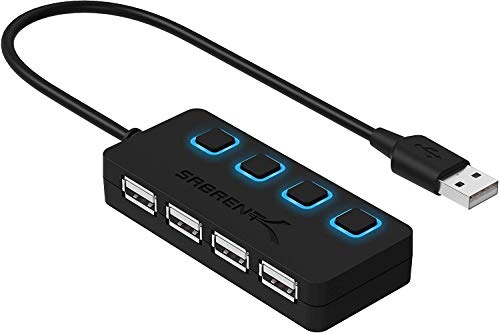
SABRENT 4-Port USB 3.0 Hub
The highest-review-count hub here — a slim portable design with individual LED-lit power switches per port, 5 Gbps transfer speeds, and a 2-year warranty. Compatible with Mac, PC, and Linux.
What We Love
- Individual LED power switch per port
- 5 Gbps, slim and portable
- 2-year warranty, broad compatibility
Reasons to Skip
- Data only — no charging
- USB-A input
The Numbers
“The highest-review-count hub here — a slim portable design with individual LED-lit power switches per port, 5 Gbps transfer speeds, and a 2-year warranty. Compatible with Mac, PC, and Linux.”

Review · 03
UGREEN USB-C Hub 5-in-1
A compact aluminum 5-in-1 hub with 4K HDMI, 100W USB-C pass-through charging, one 5 Gbps USB-A 3.0 port, and two USB-A 2.0 ports — an excellent USB-C upgrade for your monitor and laptop.
What We Love
- 4K HDMI output plus 100W PD pass-through
- 5-in-1 in a compact aluminum body
- Broad MacBook / XPS / iPad compatibility
Reasons to Skip
- HDMI tops out at 4K@30Hz
- Two ports are USB 2.0 speed
The Numbers
“A compact aluminum 5-in-1 hub with 4K HDMI, 100W USB-C pass-through charging, one 5 Gbps USB-A 3.0 port, and two USB-A 2.0 ports — an excellent USB-C upgrade for your monitor and laptop.”

Review · 04
UGREEN Revodok 1071 USB-C Hub 7-in-1
A feature-rich 7-in-1 aluminum hub with 4K HDMI, 100W PD charging, a USB-C plus dual USB-A 5 Gbps data ports, and simultaneous SD/MicroSD card reading — perfect for content creators.
What We Love
- 7-in-1: HDMI, PD, USB-C + 2 USB-A, SD/TF
- All data ports run at 5 Gbps
- Reads SD and MicroSD simultaneously
Reasons to Skip
- ~95W effective PD after overhead
- 4K HDMI at 30Hz
The Numbers
“A feature-rich 7-in-1 aluminum hub with 4K HDMI, 100W PD charging, a USB-C plus dual USB-A 5 Gbps data ports, and simultaneous SD/MicroSD card reading — perfect for content creators.”

Review · 05
Anker 7-in-1 USB-C Hub
A compact metal 7-in-1 hub with 4K HDMI, 85W USB-C PD, dual USB-A 3.0, a USB-C data port, and dual SD/TF card slots — a great all-rounder for laptops and dual card-slot users.
What We Love
- 4K HDMI + 85W PD pass-through
- Dual USB-A 5Gbps + USB-C data
- Both SD and microSD slots
Reasons to Skip
- No Ethernet on this model
- 85W PD (not full 100W)
The Numbers
“A compact metal 7-in-1 hub with 4K HDMI, 85W USB-C PD, dual USB-A 3.0, a USB-C data port, and dual SD/TF card slots — a great all-rounder for laptops and dual card-slot users.”

Review · 06
Anker 4-Port USB-C Data Hub
An ultra-slim 4-port USB-A 3.0 hub on a 2ft flexible USB-C cable with 5Gbps transfer — best for users who just need more USB-A ports off a USB-C laptop without the bulk.
What We Love
- 4 USB-A 3.0 ports at 5Gbps
- USB-C connector for modern laptops
- Slim, light, 2ft flexible cable
Reasons to Skip
- Data only — no charging
- No HDMI/card slots
The Numbers
“An ultra-slim 4-port USB-A 3.0 hub on a 2ft flexible USB-C cable with 5Gbps transfer — best for users who just need more USB-A ports off a USB-C laptop without the bulk.”
Review · 07
SABRENT 4-Port USB 2.0 Hub
An incredibly popular budget hub with individual LED power switches per port, 480Mbps USB 2.0, and daisy-chain support — the best ultra-budget desktop hub for keyboards, mice, and small peripherals.
What We Love
- Per-port LED power switches
- Dirt-cheap, hugely reviewed
- Plug-and-play, daisy-chainable
Reasons to Skip
- USB 2.0 speeds (480Mbps)
- Not for fast storage transfers
The Numbers
“An incredibly popular budget hub with individual LED power switches per port, 480Mbps USB 2.0, and daisy-chain support — the best ultra-budget desktop hub for keyboards, mice, and small peripherals.”

Review · 08
SABRENT 10-Port 60W USB 3.0 Hub
A massive 10-port powered hub with individual on/off switches and blue LED indicators per port, a 60W 12V/5A adapter, and 5Gbps speeds — the best high-port-count desktop hub for a loaded workstation.
What We Love
- 10 powered USB 3.0 ports at 5Gbps
- Per-port switches + LED indicators
- 60W adapter drives many devices
Reasons to Skip
- Needs the included power brick
- Large desktop footprint
The Numbers
“A massive 10-port powered hub with individual on/off switches and blue LED indicators per port, a 60W 12V/5A adapter, and 5Gbps speeds — the best high-port-count desktop hub for a loaded workstation.”

Review · 09
CalDigit Element 5 Thunderbolt 5 Hub
The pinnacle Thunderbolt 5 hub — 4x TB5/USB4 v2 ports at 80Gb/s, 3x USB-A + 2x USB-C 10Gb/s, 90W charging, a 180W PSU, and dual 8K@60Hz display support — built for M-series Macs and TB5 Windows power users.
What We Love
- 4x Thunderbolt 5 / USB4 v2 at 80Gb/s
- 90W host charging, 180W PSU
- Dual 8K@60Hz display support
Reasons to Skip
- Premium price
- Overkill unless you have TB5 gear
The Numbers
“The pinnacle Thunderbolt 5 hub — 4x TB5/USB4 v2 ports at 80Gb/s, 3x USB-A + 2x USB-C 10Gb/s, 90W charging, a 180W PSU, and dual 8K@60Hz display support — built for M-series Macs and TB5 Windows power users.”

Review · 10
Anker 7-Port USB 3.0 Powered Hub
A palm-sized powered hub that adds seven 5Gbps USB-A ports to a desktop or laptop, with a 36W adapter and a dedicated 2.1A charging port.
What We Love
- 7 USB 3.0 ports from one cable
- 36W adapter powers drives reliably
- Dedicated BC 1.2 charging port
Reasons to Skip
- USB-A only
- Needs a wall outlet
The Numbers
“A palm-sized powered hub that adds seven 5Gbps USB-A ports to a desktop or laptop, with a 36W adapter and a dedicated 2.1A charging port.”
How We Judge USB Hubs
USB-C vs. USB-A Hubs
Match the hub to your computer's port. USB-C multiport hubs (often called dongles or docks) plug into a single USB-C/Thunderbolt port and fan out to HDMI, USB-A, card readers, and pass-through charging — ideal for modern laptops with few ports. USB-A hubs simply add more legacy USB-A ports to a desktop or older machine. Buying the wrong type is the most common mistake, so confirm your port before anything else.
Powered vs. Bus-Powered
Bus-powered hubs draw all their energy from the host port and are great for travel and low-draw devices like flash drives and keyboards. Powered hubs include their own adapter and can reliably run high-draw devices — external hard drives, charging phones, or many devices at once — without brownouts. If you plan to connect spinning hard drives or charge tablets, buy a powered hub.
Data Speed and Display Output
Look for USB 3.0/3.2 ports rated at 5Gbps (or 10Gbps on premium hubs) for fast file transfers; USB 2.0 at 480Mbps is fine for mice and keyboards but slow for storage. For laptop docks, check the HDMI spec: many cap at 4K@30Hz, while better hubs deliver 4K@60Hz, and Thunderbolt docks drive dual or 8K displays. Power Delivery pass-through of 85–100W lets one cable charge your laptop too.
Build, Heat, and Cable Length
Aluminum housings dissipate heat far better than plastic — important for USB-C docks that run warm under load. A short, flexible captive cable keeps a desktop hub tidy, while a longer cable suits reaching a laptop. Per-port power switches (common on USB-A desktop hubs) let you cut power to idle devices. Check certifications (UL/ETL) and that the chipset is from a reputable maker for stable connections.