The 10 Best
Monitor Arms
of 2026, researched and compared.
The short answer: The HUANUO FlowLift Single Monitor Mount is our top pick for most single-screen desks, with smooth adjustment and both clamp and grommet mounting. The Ergotron LX Monitor Arm is the premium alternative with a long warranty and a reputation for durability. For two screens on a budget, the HUANUO FlowLift Dual Monitor Arm is the best value.
The shortlist
Scan our top 10 picks. Tap a row to jump to the full review, or check the price on Amazon.
Check Amazon for current pricing and availability. As an Amazon Associate we earn from qualifying purchases.
| Product | Best for | ||
|---|---|---|---|
| 01 |  HUANUO FlowLift Single Monitor MountEditor’s Choice | Editor’s Choice | Check Price |
| 02 |  Ergotron LX Monitor ArmPremium Pick | Premium Pick | Check Price |
| 03 |  HUANUO FlowLift Dual Monitor ArmBest Value | Best Value | Check Price |
| 04 |  VIVO Dual Monitor Desk Mount (V002) | — | Check Price |
| 05 |  ErGear Single Monitor Arm | — | Check Price |
| 06 |  VIVO Single Ultrawide Monitor Arm (STAND-V001) | — | Check Price |
| 07 |  ErGear Dual Monitor Arm | — | Check Price |
| 08 |  HUANUO TitanLift Heavy-Duty Monitor Arm | — | Check Price |
| 09 |  Ergotron LX Dual Stacking Monitor ArmPremium Pick | Premium Pick | Check Price |
| 10 |  WALI M002 Dual Monitor ArmBest Value | Best Value | Check Price |
HUANUO FlowLift Single Monitor MountErgotron LX Monitor ArmHUANUO FlowLift Dual Monitor ArmVIVO Dual Monitor Desk Mount (V002)ErGear Single Monitor ArmVIVO Single Ultrawide Monitor Arm (STAND-V001)ErGear Dual Monitor ArmHUANUO TitanLift Heavy-Duty Monitor ArmErgotron LX Dual Stacking Monitor ArmWALI M002 Dual Monitor ArmProduct details via Amazon Creators API. Check Amazon for current price and availability.

Review · 01
HUANUO FlowLift Single Monitor Mount
Automotive-grade single arm tested for 20,000+ motion cycles, fits 13–32" monitors, sets up in about 3 minutes, with both C-clamp and grommet options.
What We Love
- Manufacturer-rated for 20,000+ motion cycles
- Fast ~3-minute setup
- C-clamp and grommet both included
Reasons to Skip
- Single-monitor only
- Max ~19.8 lbs limits very large displays
The Numbers
“Automotive-grade single arm tested for 20,000+ motion cycles, fits 13–32" monitors, sets up in about 3 minutes, with both C-clamp and grommet options.”
Review · 02
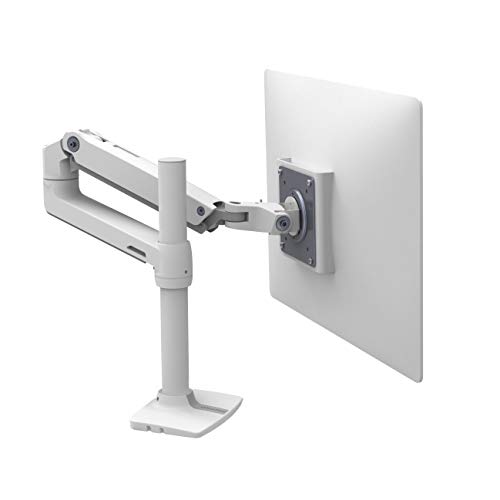
Ergotron LX Monitor Arm
The Ergotron LX is the gold standard for office monitor arms — smooth Constant Force technology, a clean white or black finish, and compatibility with monitors up to 34 inches.
What We Love
- Constant Force technology maintains any position effortlessly without drift
- Compatible with monitors up to 34 inches and 25 lbs
- PatentedCF technology makes one-finger repositioning genuinely effortless
Reasons to Skip
- One of the more expensive single-arm options
- Clamp can mark soft wood desktops without a protective pad
The Numbers
“The Ergotron LX is the gold standard for office monitor arms — smooth Constant Force technology, a clean white or black finish, and compatibility with monitors up to 34 inches.”

Review · 03
HUANUO FlowLift Dual Monitor Arm
The HUANUO FlowLift dual arm is a hugely popular pick with smooth one-hand pneumatic adjustment, wide tilt/swivel/rotate, built-in cable management, and both C-clamp and grommet mounts — holds two 13–32" screens.
What We Love
- Designed to reposition each screen with one hand
- Fits two 13–32" screens, 4.4–19.8 lbs each
- Built-in cable management and dual mount options
Reasons to Skip
- Heavier screens sag at the extremes of the range
- Assembly instructions are sparse
The Numbers
“The HUANUO FlowLift dual arm is a hugely popular pick with smooth one-hand pneumatic adjustment, wide tilt/swivel/rotate, built-in cable management, and both C-clamp and grommet mounts — holds two 13–32" screens.”

Review · 04
VIVO Dual Monitor Desk Mount (V002)
One of the most popular dual mounts — heavy-duty steel holding two 13–30" screens up to 22 lbs each, with 180° swivel, 360° rotation, and C-clamp or grommet mounting.
What We Love
- Heavy-duty steel build feels rock solid
- Holds larger, heavier screens up to 22 lbs each
- Large, long-running owner base
Reasons to Skip
- Tube-style arms are not gas-spring smooth
- Height set by collar, not one-hand glide
The Numbers
“One of the most popular dual mounts — heavy-duty steel holding two 13–30" screens up to 22 lbs each, with 180° swivel, 360° rotation, and C-clamp or grommet mounting.”

Review · 05
ErGear Single Monitor Arm
Budget-friendly single arm with a 40% wider VESA head for extra stability, fitting 13–34" screens up to 19.8 lbs, with a tool-free VESA mount and full-motion flexibility.
What We Love
- 40% wider VESA head adds real stability
- Tool-free VESA mount for quick install
- Fits up to 34" screens, full motion
Reasons to Skip
- Basic spring tension, not premium gas-spring
- No frills at this price
The Numbers
“Budget-friendly single arm with a 40% wider VESA head for extra stability, fitting 13–34" screens up to 19.8 lbs, with a tool-free VESA mount and full-motion flexibility.”

Review · 06
VIVO Single Ultrawide Monitor Arm (STAND-V001)
A heavy-duty steel single arm that handles regular screens to 32 inches and ultrawides to 38 inches at up to 22 lbs, with full tilt/swivel/rotation, 16 inches of height travel, and both C-clamp and grommet bases. One of Amazon's most-reviewed arms.
What We Love
- Handles ultrawides up to 38 inches and 22 lbs
- Huge owner base — a proven, trusted pick
- Both C-clamp and grommet bases included
Reasons to Skip
- Mechanical (not gas-spring) height adjust
- Steel build is heavier than aluminum arms
The Numbers
“A heavy-duty steel single arm that handles regular screens to 32 inches and ultrawides to 38 inches at up to 22 lbs, with full tilt/swivel/rotation, 16 inches of height travel, and both C-clamp and grommet bases. One of Amazon's most-reviewed arms.”

Review · 07
ErGear Dual Monitor Arm
A budget dual mount that holds two screens up to 32 inches at up to 17.6 lbs each, with independent tilt, swivel, and rotation, full height adjustment per arm, and tool-light VESA setup. Strong value for a two-screen workstation.
What We Love
- Holds two 32-inch screens independently
- Among the cheapest solid dual arms
- Tool-light VESA install
Reasons to Skip
- 17.6 lb per-arm limit rules out very large displays
- Steel, not aluminum
The Numbers
“A budget dual mount that holds two screens up to 32 inches at up to 17.6 lbs each, with independent tilt, swivel, and rotation, full height adjustment per arm, and tool-light VESA setup. Strong value for a two-screen workstation.”

Review · 08
HUANUO TitanLift Heavy-Duty Monitor Arm
An aluminum heavy-duty single arm built for big screens — up to 49 inches and 44 lbs — with a one-press VESA head, dual C-clamp base, and springs rated by the maker for 50,000 cycles. The pick for a large ultrawide or a heavy panel.
What We Love
- Holds up to 49 inches and 44 lbs
- Aluminum build, 50,000-cycle rated
- Dual C-clamp grips thick desks securely
Reasons to Skip
- Overkill (and pricier) for normal monitors
- Single-monitor only
The Numbers
“An aluminum heavy-duty single arm built for big screens — up to 49 inches and 44 lbs — with a one-press VESA head, dual C-clamp base, and springs rated by the maker for 50,000 cycles. The pick for a large ultrawide or a heavy panel.”

Review · 09
Ergotron LX Dual Stacking Monitor Arm
Ergotron's vertical-stacking dual arm for two screens up to 40 inches and 22 lbs each, with constant-force lift, a tall pole that expands to three or four displays, and a 10-year warranty. The premium pick for stacked multi-monitor setups.
What We Love
- Vertical stacking for two 40-inch screens
- Expandable to 3–4 displays, 10-year warranty
- Ergotron constant-force smoothness
Reasons to Skip
- Premium price
- Tall pole needs vertical clearance
The Numbers
“Ergotron's vertical-stacking dual arm for two screens up to 40 inches and 22 lbs each, with constant-force lift, a tall pole that expands to three or four displays, and a 10-year warranty. The premium pick for stacked multi-monitor setups.”

Review · 10
WALI M002 Dual Monitor Arm
A budget articulating dual-monitor desk mount for two 13 to 32 inch screens up to 22 lbs each, with extending arms, ±75° tilt, and ±90° swivel to free up desk space.
What We Love
- Holds two screens up to 32 inches
- Extending arms with tilt and swivel
- Very low price for a dual mount
Reasons to Skip
- Manual height adjustment on the pole, no gas springs
- Tension takes some tuning for heavier monitors
The Numbers
“A budget articulating dual-monitor desk mount for two 13 to 32 inch screens up to 22 lbs each, with extending arms, ±75° tilt, and ±90° swivel to free up desk space.”
How We Judge Monitor Arms
Weight Capacity and VESA Compatibility
Every monitor arm lists a weight range, typically 4–20 lbs for single-arm models and up to 40 lbs for heavy-duty dual arms. Exceeding that range causes the arm to droop over time and can damage the clamp. Confirm your monitor supports 75x75mm or 100x100mm VESA mounting. Ultrawide monitors (34 inches and above) often need arms specifically rated for wider loads and higher weight.
Clamp vs. Grommet vs. Wall Mount
Clamp mounts grip the desk edge — they are the easiest to install and relocate but require a desk lip of at least 3/4-inch thickness. Grommet mounts bolt through a hole in the desk, providing a cleaner look and more stability but requiring a permanent cutout. Wall mounts free up desk space entirely and eliminate arm wobble. Choose based on your desk material, your willingness to drill, and how often you might rearrange your setup.
Range of Motion and Cable Management
A good monitor arm offers tilt (roughly -90° to +85°), swivel (180° or more), and rotation for portrait mode. Gas-spring mechanisms allow smooth, tool-free height adjustment. Integrated cable channels keep power and video cables tidy — exposed cables defeat the purpose of a clean desk. Test the arm's reach in both extended and retracted positions to make sure it covers your preferred viewing distance.
Build Quality and Desk Protection
Arms constructed from die-cast aluminum or steel alloy outlast plastic-heavy models by years. Rubber or silicone pads on the clamp protect your desk surface from scratches and dents. Internal gas springs should be nitrogen-filled for consistent tension across temperature changes. A loose or cheap clamp will vibrate when you type and can even slip over time, so prioritize solid clamping hardware.