Standing desks have gone from a niche luxury to a genuine productivity tool. The problem is that most buyers assume they need premium-brand money to get a desk that does not wobble, has a decent motor, and will last more than two years. That is no longer true.
We compared standing desks under $500 on their spec sheets (motor type, weight capacity, height range), warranties, and what owners report about wobble, motor noise, and long-term durability. The picture is clear: you can get an excellent standing desk under $500 if you know which trade-offs you are making.
Why a Standing Desk Matters#
Research consistently links prolonged sitting with increased risk of cardiovascular disease, metabolic syndrome, and chronic back pain. A sit-stand desk lets you alternate throughout the day, keeping your blood moving and your posture in check. Beyond the health benefits, many remote workers report improved focus and energy levels when they incorporate standing intervals into their workflow.
The key is not standing all day. It is the ability to change positions effortlessly. That requires a desk with a smooth, quiet motor and enough preset memory slots to switch between your sitting and standing heights with one button press.
What to Look For Under $500#
Motor type matters most. Single-motor desks save money and are fine for a laptop or one monitor, but they lift more slowly and tend to sway more at full extension. Dual-motor desks distribute the load across both legs, which means less sway when you are typing at standing height and less strain on the motors. If you run two monitors or lean on your desk, prioritize dual motors.
Weight capacity determines longevity. If you run a multi-monitor setup with a desktop PC, speakers, and a desk lamp, you can easily push 80 to 100 pounds of gear onto your desk. A capacity rating of around 220 pounds gives you headroom for future upgrades without worrying about motor strain; 176-pound single-motor desks are better suited to lighter setups.
Warranty signals confidence. Budget desks with two-year warranties are a red flag. Look for five years or more on the frame and motors, which tells you the manufacturer trusts the internals.
Height range and frame stages#
Three-stage frames provide a wider height range, which matters if you are particularly tall or short. Two-stage frames work fine for average heights but max out sooner. Check the minimum height as well as the maximum. A desk that does not go low enough for your seated position defeats the purpose of adjustability.
Our Top Pick: FlexiSpot E6 Bamboo#
The FlexiSpot E6 is the pick if you want the stability of a dual-motor frame without paying premium-brand prices. Its two motors share the load across both legs, the frame is rated for 220 pounds, and the 55 by 28 inch solid bamboo top is deep enough for a monitor arm and a full keyboard-and-mouse setup without crowding.

FlexiSpot E6 Bamboo Standing Desk 55×28
A premium FSC-certified solid-bamboo desktop (stronger than steel by tensile strength) with dual motors, 45dB whisper-quiet operation, 220 lb capacity, a 23.6"–49.2" height range, and a 5-year frame/motor warranty.
The bamboo top is a genuine upgrade over the laminated particleboard on most budget desks: it is harder, holds screws for clamp-mounted accessories better, and looks more like furniture than office equipment. FlexiSpot backs the frame and motors with a 5-year warranty. Owners report assembly takes about an hour and is easiest with a second person when flipping the finished desk upright.
Best Frame-Only Option: VIVO DESK-E200B#
If you already have a tabletop you like, or want a top in a size or material most desks do not offer, a frame-only base is the smartest way to stay under budget. The VIVO DESK-E200B is a dual-motor steel frame rated for 220 pounds that fits tabletops from 40 to 77 inches wide and 23 to 43 inches deep, with memory presets on the controller.
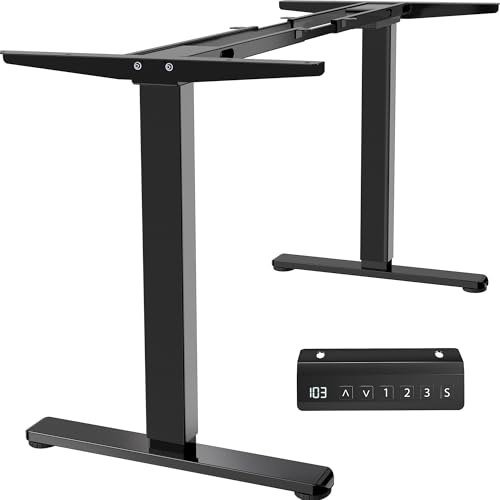
VIVO DESK-E200B Dual Motor Standing Desk Frame
A frame-only dual-motor standing desk base for a tabletop you already own: all-steel construction, memory presets, a 220 lb capacity, and support for tops from 40 to 77 inches wide.
The trade-off is that you are doing a bit more of the work: you need to buy or reuse a top at least three-quarters of an inch thick and drill pilot holes to attach it. In return you get a dual-motor base with plenty of budget left over for a solid wood or butcher-block top.
Best Value: FlexiSpot EN1 55 x 28#
The FlexiSpot EN1 is the budget pick for a single-monitor or laptop setup. It is a single-motor desk with a 176-pound capacity, four memory presets, and a 55 by 28 inch one-piece top, so you get a full-size work surface at a much lower price than dual-motor desks.

FlexiSpot EN1 Standing Desk 55×28
A wide 55×28 one-piece seamless desktop with a 1"-thick surface for superior rigidity, 4 memory presets, and 176 lb capacity — ideal for dual-monitor power users who need a larger work surface.
Single-motor frames are slower and sway a little more at full standing height, so this is not the desk for a heavy dual-monitor rig. For a laptop, one monitor, and a few accessories, owners find it more than stable enough, and the one-piece top avoids the seam that splice-board budget desks have down the middle.
Best for Storage: SHW 55 x 28 Electric Desk#
If your desk doubles as your only storage, the SHW 55 by 28 inch electric desk adds a drawer, an under-desk cable tray, and hooks for headphones or bags on top of four memory presets and a curved front edge that is kinder to your forearms.

SHW 55×28 Electric Standing Desk
A 55×28 electric standing desk with a built-in under-desk drawer, 4 memory presets, a cable-management tray, 2 utility hooks, and a patent-protected curved-edge design — exceptional storage and organization.
It is the most practical choice for small rooms where a separate filing cabinet or shelf is not an option. As with any desk with a built-in drawer, check that the drawer clears your knees at your seated height before you commit.
Not Ready to Replace Your Desk? VIVO Desk Converter#
If you love your current desk, or you rent and cannot swap furniture, a converter sits on top of it and lifts your monitor and keyboard to standing height. The VIVO DESK-V000K has a 31.5-inch top for one or two monitors, a separate keyboard tray, and a gas-spring lift for up to 33 pounds.

VIVO 32" Standing Desk Converter (DESK-V000K)
Best ValueA sit-stand converter that sits on your existing desk: a 31.5-inch top with a separate keyboard tray, gas-spring lift for up to 33 lbs, and 4.5 to 20 inches of height adjustment — no new desk required.
Converters are cheaper and need no assembly beyond attaching the tray, but they take up desk depth when raised and are manual rather than motorized. For many people they are the low-risk way to find out whether they will actually stand before investing in a full electric desk.
Assembly and Setup Tips#
Regardless of which desk you choose, follow these steps for the best experience:
- Clear the room first. You need about six feet of open floor space to lay out the frame and flip the assembled unit.
- Use a power drill. Hand-tightening the bolts is technically possible but will add 20 minutes and leave you with sore hands.
- Set your heights immediately. Program your sitting height, standing height, and one intermediate height into the memory controller on day one. If the presets are ready, you will actually use them.
- Route cables before loading gear. Once your monitors and accessories are on the desk, running cables underneath becomes much harder. Set up your cable management tray or sleeves while the desktop is still empty.
Common Questions#
What is the best standing desk under $500? For most people it's the FlexiSpot E6 Bamboo: a dual-motor frame rated for 220 lbs, a solid bamboo 55 x 28 inch top, and a 5-year warranty. If you already have a tabletop, the VIVO DESK-E200B dual-motor frame is the most flexible way to stay under budget, and if you only run a laptop or one monitor, the single-motor FlexiSpot EN1 costs much less.
Are standing desks under $500 any good? Yes — the sub-$500 tier is where price and quality meet for a home office. You can get a stable dual-motor frame, a solid weight capacity, and a memory keypad; what you give up versus premium-brand desks is mostly premium finishes, a wider desktop, and marginally less wobble at full height. The cheapest single-motor desks are fine for light setups but start to sway and slow down with dual monitors.
What is the best standing desk under $500 for tall users? Height range is the spec that matters if you're tall. Look for a frame that reaches at least 48 to 50 inches at the top of its travel, which usually means a three-stage frame. Most budget two-stage desks top out a few inches lower, so check the maximum height against your elbow height when standing before you buy.
Can you get an electric standing desk under $500? Yes, and you should. Every full desk in this guide is electric with memory presets, and dual-motor options like the FlexiSpot E6 and the VIVO DESK-E200B frame fit comfortably under $500. Manual hand-crank desks are cheaper but slow enough that most people stop adjusting them, which defeats the purpose; the one manual pick here is a converter for people keeping their current desk.
Final Verdict#
The FlexiSpot E6 Bamboo is our top pick under $500: dual motors, a 220-pound capacity, a real bamboo top, and a 5-year warranty make it the best long-term buy in this range. If you already own a good tabletop, the VIVO DESK-E200B frame gives you the same dual-motor stability for less. If budget is the primary concern and your setup is light, the FlexiSpot EN1 delivers a full-size electric desk at a fraction of the cost, and the SHW desk is the pick when you need built-in storage.
And if you are not sure you will stand enough to justify a new desk, start with the VIVO converter on the desk you already have.