Choosing a monitor arm comes down to three things: your monitor's real weight and size (with headroom), whether your desk can actually hold a clamp, and how often you'll move the screen. Weight and size decide which arms are even eligible, the desk decides how it mounts, and your daily habits decide whether you need a smooth spring arm or a set-once mount.
Want our ranked shortlist? See the best monitor arms.
This guide covers the measurements to take before you shop, the trade-offs between arm styles, what you gain at each budget level, and the setup mistakes that make good arms sag, wobble, or mark your desk.
What to Measure and Check Before You Buy#
Your monitor's weight without the stand#
Spec sheets often list two weights: with stand and without. The arm only carries the panel, so use the without-stand figure, then add a little for the VESA plate and any adapter bracket. Aim for an arm whose rated range puts your monitor in the middle, not at the top. A spring near the top of its range has less adjustment left and is more prone to drifting down over time.
Screen size and shape#
Size matters separately from weight because of leverage. A wide panel puts more twisting force on the arm's head and joints than a compact one of the same weight. Curved ultrawides add a second problem: their center of gravity sits behind the mounting point, so the screen tends to tip forward or droop. If you run a curved panel over 34 inches, look for arms explicitly rated for that size, like the HUANUO TitanLift, which is rated up to 49 inches and 44 lbs, rather than stretching a general single arm.
The VESA pattern on the back#
Look for four threaded holes in a square, 75 by 75 mm or 100 by 100 mm. Nearly every arm supports both. If there are no holes, or they're recessed behind a curved back panel, you'll need an adapter bracket or longer bolts with spacers, so confirm that before ordering.
Desk thickness, edge, and core#
Measure your desktop's thickness and check the back edge. Clamps need a flat, unobstructed edge and a thickness inside the clamp's range, which on most arms covers roughly 0.4 to 3.4 inches; check the exact spec. If your desk has a back lip, a hutch, a modesty panel, or a frame crossbar right at the edge, you'll need a grommet mount through a hole instead.
Then check what the desk is made of. Solid wood, plywood, and steel-reinforced tops handle clamp pressure well. Hollow-core tops, the lightweight kind with a cardboard honeycomb inside, can crush under a clamp, and soft particleboard can dent. On those desks, spread the load with a steel reinforcement plate under the clamp, and don't over-tighten.
Space behind the desk#
Arms swing back as well as forward. If your desk sits flush against a wall, the clamp base, the arm's elbow, and the cables all need room. Check how far the arm sticks out behind the mounting point when folded, and leave space for the power and video cable to bend without kinking.
Where your eyes are#
Sit the way you normally work and measure from the floor to your eye level. The top edge of the screen should land at or slightly below that line, at roughly arm's length away. Compare that to the arm's height range. If you use a standing desk, the arm doesn't need to cover sitting and standing heights, because the desk moves with you, but it does need to hold position as the desk travels.
The Decision Axes and Trade-Offs#
How often you move the screen#
If you push the screen away to write on paper, pull it close to read, rotate it to portrait, or angle it toward a colleague, you want a spring arm that moves with one hand and stays where you leave it. If you set the position once, a pole-style mount with a collar to fix height, like the VIVO V002, is sturdy and cheaper. You give up quick adjustments, not stability.
Single, dual, or stacked#
Two screens side by side on one pole need a desk wide enough for both arms to reach out. Stacking one screen above the other saves width but raises the top screen, which forces you to look up and works best when the upper screen is a reference display you glance at rather than read all day. A stacking arm like the Ergotron LX Dual Stacking needs vertical clearance for its tall pole.
Reach vs desk depth#
A long reach lets you pull the screen toward you and push it back, which matters on deep desks and corner setups. On a shallow desk, a long reach is wasted and the elbow may hit the wall. Match reach to the distance between the mounting point and where you want the screen.
Aluminum vs steel#
Aluminum arms are lighter and often move more smoothly; steel arms are heavier and very stiff for the price. Both work. The build matters less than buying the right capacity.
Budget Tiers: What You Gain at Each Level#
Budget. Steel pole mounts and basic single arms. They get screens off the desk and free up depth, but adjustments may need two hands or a tool, and tension can need retuning over time. Good for screens you set once.
Mid-range. One-hand spring arms with full tilt, swivel, and rotation, both clamp and grommet hardware in the box, and built-in cable channels. This is where most people should buy.
Premium. Smoother constant-force mechanisms, higher capacity for big ultrawides, stacking or expandable designs, and longer warranties. Ergotron backs its LX arms with a 10-year warranty, which is the main reason they last across several monitor upgrades.
Common Mistakes to Avoid#
- Never adjusting the tension. Arms ship with a factory tension setting that rarely matches your exact monitor. If the screen drifts up or sinks after installation, turn the tension screw until it holds still at any height. This one step fixes most complaints about sag.
- Buying right at the weight limit. You'll run out of tension adjustment and the screen will drift down over time.
- Ignoring curved-monitor balance. A heavy curved panel tips forward on arms not rated for it.
- Over-tightening the clamp on a soft or hollow desk. Use a reinforcement plate and snug the clamp, don't crank it.
- Cables too short or too tight. Leave enough slack for the screen's full range of motion, and for the full travel of a standing desk.
- Mounting on a wobbly desk. An arm extends the screen away from the desk's center, which amplifies any desk wobble, especially at standing height.
Picks by Need#
For one monitor you adjust often#
The HUANUO FlowLift Single fits 13 to 32-inch monitors from 4.4 to 19.8 lbs, includes both clamp and grommet hardware, and HUANUO rates it for 20,000+ motion cycles. A sensible default for one standard monitor.

HUANUO FlowLift Single Monitor Mount
Editor’s ChoiceAutomotive-grade single arm tested for 20,000+ motion cycles, fits 13–32" monitors, sets up in about 3 minutes, with both C-clamp and grommet options.
For frequent sit-stand changes and long-term use#
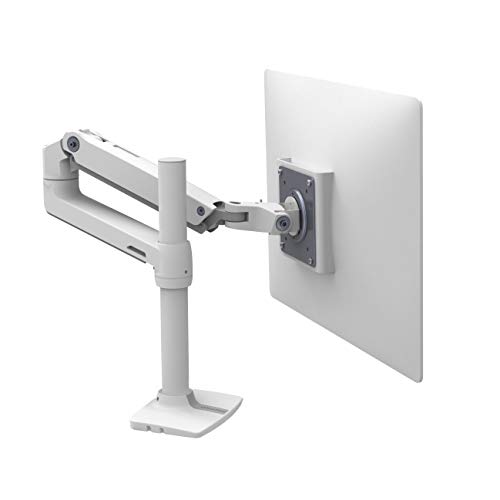
The Ergotron LX uses constant-force tension, holds monitors up to 34 inches and 25 lbs, and comes with a 10-year warranty. Worth it if you reposition the screen many times a day and plan to keep the arm for years.
Ergotron LX Monitor Arm
Premium PickThe Ergotron LX is the gold standard for office monitor arms — smooth Constant Force technology, a clean white or black finish, and compatibility with monitors up to 34 inches.
For two side-by-side screens#
The HUANUO FlowLift Dual holds two 13 to 32-inch screens at 4.4 to 19.8 lbs each, with one-hand adjustment per arm and built-in cable management. Owners report heavier screens can sag at the extremes of the range, so leave weight headroom.

HUANUO FlowLift Dual Monitor Arm
Best ValueThe HUANUO FlowLift dual arm is a hugely popular pick with smooth one-hand pneumatic adjustment, wide tilt/swivel/rotate, built-in cable management, and both C-clamp and grommet mounts — holds two 13–32" screens.
For big or heavy ultrawides#
The HUANUO TitanLift is an aluminum heavy-duty single arm rated for screens up to 49 inches and 44 lbs, with a dual C-clamp base. Overkill for a normal monitor, but the right tool for a large curved panel.

HUANUO TitanLift Heavy-Duty Monitor Arm
An aluminum heavy-duty single arm built for big screens — up to 49 inches and 44 lbs — with a one-press VESA head, dual C-clamp base, and springs rated by the maker for 50,000 cycles. The pick for a large ultrawide or a heavy panel.
For stacked screens on a narrow desk#
The Ergotron LX Dual Stacking holds two screens up to 40 inches and 22 lbs each, one above the other, and can expand to three or four displays. Check vertical clearance for the tall pole before ordering.

Ergotron LX Dual Stacking Monitor Arm
Premium PickErgotron's vertical-stacking dual arm for two screens up to 40 inches and 22 lbs each, with constant-force lift, a tall pole that expands to three or four displays, and a 10-year warranty. The premium pick for stacked multi-monitor setups.
Frequently Asked Questions#
Why does my monitor arm keep sagging?#
Usually the tension is set too low for your monitor's weight. Find the tension adjustment, often a hex screw near the elbow or in the arm's base, and turn it in small steps until the screen holds still at any height. If you've maxed out the adjustment and it still sinks, the monitor is too heavy for the arm or too close to its limit.
Can you put a monitor arm on a standing desk?#
Yes, and it's one of the best pairings. Check that the arm plus monitor stays within the desk's lifting capacity, leave enough cable slack for the desk's full travel, and clamp to a solid section of the desktop. Because the arm extends the screen away from the desk, a frame that wobbles at standing height will make the screen shake more.
Will a monitor arm damage my desk?#
It can on soft, thin, or hollow-core desktops. A clamp concentrates force on a small area, which can dent particleboard or crush a honeycomb core. Use the included pads, add a steel reinforcement plate on weaker desks, and tighten until firm rather than as tight as possible.
Can a monitor arm hold a curved ultrawide?#
Yes, if it's rated for both the weight and the size. Curved screens sit forward of the mounting point, so they put more leverage on the arm than flat screens of the same weight. Choose an arm rated beyond your panel's size and weight, and expect to raise the tension after mounting.
For specific models ranked side by side, see the best monitor arms, and read our dual monitor setup guide if you're mounting two screens.