The 10 Best
Keyboards
of 2026, researched and compared.
The short answer: The Keychron Q1 Pro is our top pick for typists who want a solid, gasket-mounted aluminum mechanical keyboard with wireless Bluetooth. On a budget, the Keychron C1 Pro 8K TKL delivers a fast tenkeyless board with hot-swappable switches for much less. If you prefer quiet, low-profile keys, the Logitech MX Keys S Wireless Keyboard is the main alternative.
The shortlist
Scan our top 10 picks. Tap a row to jump to the full review, or check the price on Amazon.
Check Amazon for current pricing and availability. As an Amazon Associate we earn from qualifying purchases.
| Product | Best for | ||
|---|---|---|---|
| 01 |  Keychron Q1 ProEditor’s Choice | Editor’s Choice | Check Price |
| 02 |  Corsair K70 RGB Pro | — | Check Price |
| 03 |  Keychron K8 Wireless Mechanical Keyboard | — | Check Price |
| 04 |  Keychron C1 Pro 8K TKL KeyboardBest Value | Best Value | Check Price |
| 05 |  Apple Magic Keyboard with Touch ID | — | Check Price |
| 06 |  Logitech MX Keys S for Mac | — | Check Price |
| 07 |  Logitech MX Keys Mini for Mac | — | Check Price |
| 08 |  Logitech MX Keys S Wireless Keyboard | — | Check Price |
| 09 |  Logitech MX Mechanical Wireless Keyboard | — | Check Price |
| 10 |  Logitech K780 Multi-Device Keyboard | — | Check Price |
Keychron Q1 ProCorsair K70 RGB ProKeychron K8 Wireless Mechanical KeyboardKeychron C1 Pro 8K TKL KeyboardApple Magic Keyboard with Touch IDLogitech MX Keys S for MacLogitech MX Keys Mini for MacLogitech MX Keys S Wireless KeyboardLogitech MX Mechanical Wireless KeyboardLogitech K780 Multi-Device KeyboardProduct details via Amazon Creators API. Check Amazon for current price and availability.

Review · 01
Keychron Q1 Pro
The Keychron Q1 Pro is the best all-around mechanical keyboard — a 75% layout with a gasket-mounted CNC aluminum body, QMK/VIA support, and wireless Bluetooth 5.1.
What We Love
- CNC aluminum body with gasket mount delivers a premium thocky typing feel
- QMK/VIA firmware support allows complete keymap customization without software
- Wireless Bluetooth 5.1 with 4000 mAh battery lasts 300+ hours between charges
Reasons to Skip
- 75% layout omits the numpad which some power users and accountants will miss
- Pre-lubed stock switches are good but enthusiasts will want to relube for best sound
The Numbers
“The Keychron Q1 Pro is the best all-around mechanical keyboard — a 75% layout with a gasket-mounted CNC aluminum body, QMK/VIA support, and wireless Bluetooth 5.1.”

Review · 02
Corsair K70 RGB Pro
The Corsair K70 RGB Pro is the best full-size mechanical keyboard for users who want dedicated media controls, a numpad, and the proven reliability of Cherry MX switches.
What We Love
- Cherry MX switches are time-tested across millions of keystrokes for long-term reliability
- Dedicated media controls with a textured aluminum volume roller are a tactile luxury
- PBT double-shot keycaps resist shine and fading far better than ABS alternatives
Reasons to Skip
- Full-size layout requires significant desk footprint — not ideal for small desks
- No wireless option means permanent cable management consideration
The Numbers
“The Corsair K70 RGB Pro is the best full-size mechanical keyboard for users who want dedicated media controls, a numpad, and the proven reliability of Cherry MX switches.”

Review · 03
Keychron K8 Wireless Mechanical Keyboard
A tenkeyless wireless board for Mac and Windows: Bluetooth across three devices or USB-C wired, a long-lasting 4000mAh battery, tactile brown switches, white backlight, and an aluminum frame — a reliable everyday keyboard.
What We Love
- Wireless Bluetooth (3 devices) or USB-C wired
- Long-lasting 4000mAh battery
- Dual Mac/Windows keycaps included
Reasons to Skip
- TKL layout omits a numpad
- Tall profile — a wrist rest helps for long typing sessions
The Numbers
“A tenkeyless wireless board for Mac and Windows: Bluetooth across three devices or USB-C wired, a long-lasting 4000mAh battery, tactile brown switches, white backlight, and an aluminum frame — a reliable everyday keyboard.”

Review · 04
Keychron C1 Pro 8K TKL Keyboard
An ultra-fast 8000Hz polling TKL with QMK/Keychron Launcher support, hot-swappable pre-lubed Super Red switches, south-facing RGB, double-shot PBT keycaps, and a 1-year warranty — the best budget Keychron for fast typists.
What We Love
- 8000Hz polling, hot-swappable Super Red
- QMK / Keychron Launcher programmable
- Double-shot PBT keycaps, great value
Reasons to Skip
- Wired only
- TKL drops the numpad
The Numbers
“An ultra-fast 8000Hz polling TKL with QMK/Keychron Launcher support, hot-swappable pre-lubed Super Red switches, south-facing RGB, double-shot PBT keycaps, and a 1-year warranty — the best budget Keychron for fast typists.”

Review · 05
Apple Magic Keyboard with Touch ID
Apple's flagship Bluetooth keyboard with Touch ID fingerprint authentication, 1-month+ battery, USB-C charging, and scissor-mechanism keys — the cleanest companion for any Mac with Apple silicon.
What We Love
- Touch ID for secure one-tap login
- Crisp scissor keys, slim profile
- USB-C charging, ~1-month battery
Reasons to Skip
- Touch ID requires a Mac with Apple silicon
- No backlighting
The Numbers
“Apple's flagship Bluetooth keyboard with Touch ID fingerprint authentication, 1-month+ battery, USB-C charging, and scissor-mechanism keys — the cleanest companion for any Mac with Apple silicon.”

Review · 06
Logitech MX Keys S for Mac
The Mac-optimized MX Keys S with a Space Grey finish, Mac key layout, smart auto-backlight, USB-C recharge, Logi Bolt + Bluetooth 3-device pairing, and Smart Actions via Logi Options+.
What We Love
- Spherically-dished keys, superb typing feel
- Smart proximity backlight, Smart Actions
- 3-device pairing, USB-C rechargeable
Reasons to Skip
- Premium price
- Membrane, not mechanical
The Numbers
“The Mac-optimized MX Keys S with a Space Grey finish, Mac key layout, smart auto-backlight, USB-C recharge, Logi Bolt + Bluetooth 3-device pairing, and Smart Actions via Logi Options+.”

Review · 07
Logitech MX Keys Mini for Mac
A compact, minimalist Mac keyboard with smart backlit keys, Dictation and Emoji smart keys, USB-C recharge, and Flow-enabled multi-device workflow with the MX Master 3S for Mac — great for saving desk space.
What We Love
- Compact 75% footprint frees desk space
- Smart backlight, Dictation/Emoji keys
- Flow + 3-device pairing, USB-C
Reasons to Skip
- No numpad
- Membrane switches
The Numbers
“A compact, minimalist Mac keyboard with smart backlit keys, Dictation and Emoji smart keys, USB-C recharge, and Flow-enabled multi-device workflow with the MX Master 3S for Mac — great for saving desk space.”

Review · 08
Logitech MX Keys S Wireless Keyboard
A low-profile, full-size wireless keyboard with spherically dished keys, proximity backlighting, 3-device pairing, and Smart Actions shortcuts — the quiet, laptop-like typist's pick for long workdays.
What We Love
- Quiet, precise low-profile scissor keys
- Pairs 3 devices, Logitech Flow support
- Backlight wakes as your hands approach
Reasons to Skip
- Not mechanical — shallow key travel
- Battery drops fast with backlight on
The Numbers
“A low-profile, full-size wireless keyboard with spherically dished keys, proximity backlighting, 3-device pairing, and Smart Actions shortcuts — the quiet, laptop-like typist's pick for long workdays.”

Review · 09
Logitech MX Mechanical Wireless Keyboard
A full-size, low-profile mechanical keyboard with Tactile Quiet switches, smart backlighting, and 3-device pairing — mechanical feel without the office-annoying clatter.
What We Love
- Tactile Quiet low-profile mechanical switches
- 3-device Bluetooth/Bolt pairing with Flow
- Smart backlighting, USB-C charging
Reasons to Skip
- No hot-swap or keycap customization
- Full-size footprint eats mouse space
The Numbers
“A full-size, low-profile mechanical keyboard with Tactile Quiet switches, smart backlighting, and 3-device pairing — mechanical feel without the office-annoying clatter.”
Review · 10
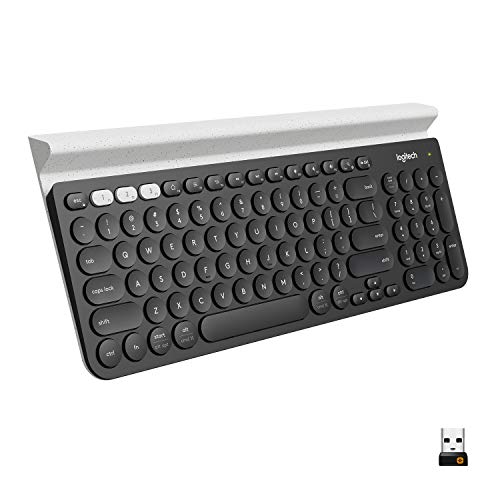
Logitech K780 Multi-Device Keyboard
A full-size, quiet wireless keyboard with a built-in cradle that holds a phone or tablet, and Easy-Switch buttons to type on up to three devices over Bluetooth or USB receiver.
What We Love
- Built-in cradle for a phone or tablet
- Switches between 3 devices
- Quiet keys and a full number pad
Reasons to Skip
- Not backlit
- Cradle makes it deep on small desks
The Numbers
“A full-size, quiet wireless keyboard with a built-in cradle that holds a phone or tablet, and Easy-Switch buttons to type on up to three devices over Bluetooth or USB receiver.”
How We Judge Keyboards
Switch Type: Linear, Tactile, and Clicky
Linear switches (like Cherry MX Red) press straight down with no bump — ideal for fast typists and gamers who want smooth keystrokes. Tactile switches (like Cherry MX Brown) have a slight bump at the actuation point, giving your fingers feedback without excessive noise. Clicky switches (like Cherry MX Blue) add an audible click that confirms each keystroke but can be disruptive in shared spaces. Try a switch tester before committing to a full board.
Form Factor: Full-Size to 60%
Full-size keyboards include a number pad and function row but consume significant desk space. Tenkeyless (TKL or 80%) removes the number pad, freeing about 4 inches of width. 65% and 60% boards go further, eliminating the function row and arrow keys (accessed via a function layer). For desk-space-constrained setups, a 65% layout offers the best balance between compactness and usable key count.
Build Quality: Case and Keycap Materials
Aluminum cases provide weight, rigidity, and a premium acoustic profile, while plastic cases are lighter and cheaper. For keycaps, PBT plastic resists shine and wear far better than ABS, which develops an oily sheen within months of heavy use. Double-shot keycaps have legends molded through the plastic rather than printed on, so they never fade. Gasket-mount designs dampen vibration between the plate and case for a softer, more refined typing feel.
Wireless Connectivity and Battery Life
Wireless mechanical keyboards use either Bluetooth or a 2.4 GHz USB dongle. Bluetooth supports multiple device pairing but can introduce slight input lag. A 2.4 GHz dongle provides near-wired responsiveness (under 1 ms lag). Battery life varies from one week to six months depending on backlighting usage. Hot-swappable boards let you change switches without soldering, which extends the keyboard's useful life across changing preferences.