The internet is full of desk setup photos featuring flagship chairs, high-end monitors, and boutique keyboards. Those setups look incredible, but they are not realistic for most people starting out. The good news is that you can build a genuinely comfortable, functional, and professional-looking desk setup for under $300 — if you spend wisely on the things that matter and skip the things that do not.
This guide breaks down where to allocate a $300 budget for maximum impact. Every product here was chosen by comparing specs, warranties, and owner feedback, and is one we would confidently recommend. Prices move constantly, so the figures below are rough ranges; check the current price on Amazon before you buy.
The Budget Allocation Strategy#
When money is tight, not all accessories deliver equal value. Here is how to prioritize, with typical price ranges:
- Desk mat (about $10–30): Defines your workspace, protects the desk, and replaces a separate mouse pad.
- Keyboard (about $60–80): A good keyboard prevents wrist fatigue and makes typing enjoyable rather than tedious.
- Mouse (about $30–40): A comfortable, well-shaped mouse matters more than any spec sheet number.
- Webcam (about $40–70): The most visible upgrade to colleagues and clients on video calls.
- Cable management (about $20–30): A cable sleeve and velcro ties transform any desk from chaotic to clean.
- Desk lamp (about $20–40): Proper lighting reduces eye strain and improves your on-camera appearance.
Taken together, that usually lands well under $300, often closer to $200 to $250, leaving room for shipping, tax, or one upgrade.
The Desk Mat: CENNBIE XL Leather Desk Mat#
At 39.3 by 19.6 inches (about 1000 by 500 millimeters), the CENNBIE XL is large enough to cover your whole working area, so you never need a separate mouse pad. The PU leather surface wipes clean in seconds, the stitched edges resist fraying, and the anti-slip base keeps it from creeping across the desk.

CENNBIE XL Leather Desk Mat (39.3 x 19.6 in)
An extra-large PU leather desk pad with stitched edges and an anti-slip base that covers keyboard, mouse, and notebook space — easy to wipe clean.
PU leather is smooth enough for everyday optical mouse tracking, though gamers who want a precision surface should pick a micro-weave cloth mat instead. For productivity work, it is more than sufficient and makes even a cheap desk look intentional.
The Keyboard: Keychron K8#
The Keychron K8 is the budget mechanical keyboard we recommend most. Its tenkeyless layout drops the number pad, which brings your mouse closer to your body and reduces shoulder reach, while keeping the arrow keys and function row you use every day. It connects over Bluetooth to up to three devices or by USB-C cable, and the brown tactile switches give clear feedback without the clatter of clicky switches.

Keychron K8 Wireless Mechanical Keyboard
A tenkeyless wireless board for Mac and Windows: Bluetooth across three devices or USB-C wired, a long-lasting 4000mAh battery, tactile brown switches, white backlight, and an aluminum frame — a reliable everyday keyboard.
The K8 is fairly tall, so pair it with a wrist rest if you type for long stretches. In return you get a genuinely mechanical typing experience that membrane keyboards cannot match, at a price that leaves plenty of budget for the rest of this list.
The Mouse: Logitech M720 Triathlon#
The Logitech M720 is a full-size, sculpted right-handed mouse that fills your palm instead of forcing a cramped claw grip, which is the main source of hand fatigue with tiny budget mice. It switches between three computers at the press of a button, connects by Bluetooth or USB receiver, and its single AA battery is rated for up to 24 months.

Logitech M720 Triathlon Multi-Device Mouse
Best ValueA full-size, right-handed multi-device mouse that switches between 3 computers at the press of a button, with hyper-fast scrolling and a battery rated for up to 24 months on one AA.
The hyper-fast scroll wheel is a genuine productivity feature for long documents and spreadsheets. If you already have wrist pain, consider a vertical mouse instead; for most people, a well-shaped full-size mouse like the M720 is the comfortable, low-risk choice.
The Webcam: NexiGo N930AF#
The built-in webcam on most laptops produces a grainy, washed-out image that makes you look unprofessional on video calls. The NexiGo N930AF fixes the biggest problems for very little money: sharp 1080p video, autofocus that keeps you crisp when you lean in, a noise-reducing built-in mic, and a privacy cover for when you are off camera.
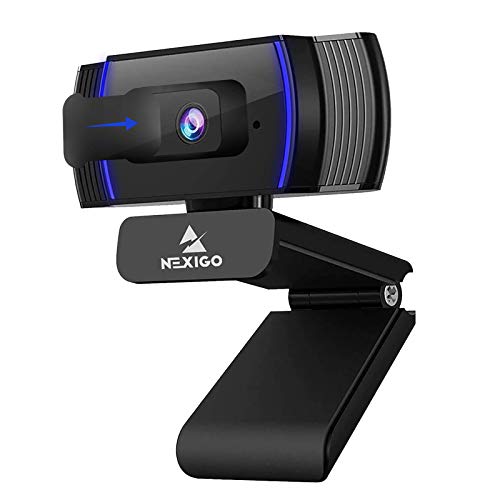
NexiGo N930AF 1080p Autofocus Webcam
Best ValueAn inexpensive 1080p/30fps webcam with autofocus, a noise-reducing built-in mic, and a privacy cover — a budget upgrade over a blurry laptop camera for daily calls.
It struggles in very dim rooms, which is exactly why the desk lamp below matters. Light your face from the front, and a budget webcam like this looks far better than a premium one in the dark.
Cable Management: JOTO Sleeve + Velcro Ties#
Even on a budget, cable management makes a massive visual difference. The JOTO zipper sleeves bundle your desk-to-floor cables into a single clean run, and a pack of VELCRO cable ties handles any remaining bundling.

JOTO Zipper Cable Sleeve (4-Pack)
Best ValueFour 20-inch neoprene zip-up cable sleeves that bundle the cables running from your desk to the floor into one tidy, flexible tube — no tools needed.
This small investment transforms the underside of your desk from a cable jungle to a clean, intentional setup. It also makes future changes easier because velcro ties are reusable and the JOTO sleeve's zip opening lets you add or remove cables without starting over.
The Desk Lamp: Lepro LED Desk Lamp#
The Lepro LED desk lamp gives you five color modes and five brightness levels through a frosted diffuser, so the light is soft and even rather than a harsh point source. Flicker-free LEDs matter more than they sound: cheap lamps can flicker at frequencies that cause headaches and eye fatigue during long sessions, even when you cannot see it.

Lepro 9.5W LED Desk Lamp
Best ValueA budget metal LED desk lamp with 5 lighting modes and 5 brightness levels, a frosted diffuser for non-glaring light, and a slim footprint for small desks.
Its slim metal base takes up very little desk space. Angle it so it lights your desk and your face from the front, not your screen, and you get easier reading and a noticeably better webcam image.
What This Budget Does Not Cover#
A $300 budget assumes you already have a desk and a chair. If you are working from a kitchen table and a dining chair, prioritize a proper ergonomic chair over any accessory on this list. A bad chair will cause more damage than a good keyboard can prevent.
Similarly, this budget assumes you have a monitor or are using a laptop screen. If you need a monitor, a budget 27-inch 1080p display like the Philips 271V8LB is the cheapest meaningful upgrade over a laptop screen, but it would take a large share of this budget on its own.
Common Questions#
How much does a good desk setup cost? If you already have a desk and chair, you can build a comfortable, professional-looking setup for under $300 in accessories — spending on the pieces you touch and see all day (keyboard, mouse, mat, webcam, lighting) and skipping the rest. A complete setup including a desk and an ergonomic chair typically runs $600 to $900 done well on a budget. The trap isn't the total; it's overspending on flashy gear while ignoring the chair and monitor height that actually decide how you feel.
What should you buy first on a budget desk setup? Spend first on what your body touches for eight hours: a supportive chair and the correct desk height, then a keyboard and mouse that fit your hands. Cosmetic upgrades like a desk mat and lighting come after the ergonomics are right. If you're starting from a kitchen table and a dining chair, a proper chair beats every accessory on this list.
Can you get a decent work-from-home setup under $300? Yes — if that budget goes to accessories and you already own a desk and chair. This guide assembles a desk mat, mechanical keyboard, comfortable mouse, 1080p autofocus webcam, cable management, and a flicker-free desk lamp, usually for well under $300. If you also need a desk and chair, plan closer to $600 to $900 and upgrade the accessories over time.
The Growth Path#
This $300 setup is designed to be upgraded incrementally. Start here, and when budget allows, upgrade in this order: chair, monitor, standing desk, keyboard. Each upgrade builds on the foundation without requiring you to replace anything you already bought.