Developers spend more time at their desks than almost any other profession. Ten-hour days are common. Twelve-hour days during sprints are not unusual. This makes the ergonomic and productivity impact of your desk setup more significant than for the average remote worker. The wrong keyboard leads to RSI. The wrong monitor means squinting at 12-point code for hours. The wrong chair produces back pain that follows you home.
This guide is built specifically for developers who treat their workspace as professional tooling — just as important as their IDE, their terminal, and their version control system.
The Keyboard: Your Most Important Tool#
For developers, the keyboard is not just an input device. It is the primary interface to your craft. You press keys thousands of times a day, and the feel, layout, and responsiveness of your keyboard directly affect your speed, accuracy, and comfort.
Mechanical is non-negotiable#
Membrane keyboards are fine for occasional use, but for professional development work, a mechanical keyboard is a meaningful upgrade. The tactile feedback reduces missed keystrokes, the actuation force prevents bottoming-out fatigue, and the sound profile provides auditory confirmation of each keypress that keeps your rhythm consistent.

Keychron Q1 Pro
Editor’s ChoiceThe Keychron Q1 Pro is the best all-around mechanical keyboard — a 75% layout with a gasket-mounted CNC aluminum body, QMK/VIA support, and wireless Bluetooth 5.1.
The Keychron Q1 Pro is our top pick for developers. The 75 percent layout includes a function row (critical for IDE shortcuts and debugging) while eliminating the numpad that most developers never use. The QMK/VIA firmware gives you complete keymap control — you can remap any key, create macros, and set up layers for different workflows without installing proprietary software.
The gasket-mounted CNC aluminum body produces a satisfying typing feel that is audible enough to provide feedback but quiet enough for video calls. Wireless Bluetooth 5.1 with a 4000 mAh battery lasts 300 or more hours, which means weekly charging rather than daily.
The compact alternative#
For developers who prefer an even smaller footprint, the NuPhy Air75 V2 offers hall-effect switches in an ultra-slim 18mm profile. The switches are immune to contact wear, which means they last the lifetime of the keyboard. The trade-off is a shallower 3mm keytravel that feels different from traditional mechanical boards.

NuPhy Air75 V2
The NuPhy Air75 V2 is the definitive low-profile wireless mechanical keyboard — 75% layout, hall-effect switches, and an ultra-slim 18mm profile that rivals Apple's Magic Keyboard.
The Monitor Setup: Screen Real Estate Matters#
Developers need screen real estate. An IDE with a file tree, code editor, terminal, and version control panel open simultaneously demands space that a single laptop screen cannot provide. The question is whether to go with a single large display or a dual-monitor configuration.
The single 4K recommendation#
A single 27-inch 4K monitor at 100 percent scaling gives you enough resolution to display two full code files side by side at readable font sizes. This is sufficient for most development workflows, including frontend, backend, and full-stack work.

Dell 27 Plus 4K Monitor (S2725QS)
A stunning 27" 4K IPS panel with 120Hz, AMD FreeSync Premium, 99% sRGB, ComfortView Plus blue-light reduction, re-engineered speakers, and full ergonomic adjustment — the best all-around productivity + multimedia monitor.
The Dell S2725QS pairs a 27-inch 4K IPS panel with a 120Hz refresh rate, which makes scrolling through code files and terminal output visually smooth. Its 99 percent sRGB coverage is a bonus for developers who also do frontend work and want colors that match what most users will see.
The dual-monitor recommendation#
If your workflow involves constant reference — documentation on one screen, code on the other — dual monitors are worth the added complexity. Mount them on independent arms for precise positioning and route cables through the arms' internal channels.
The Ergotron LX Monitor Arm is the gold standard for developer setups. Its Constant Force technology means your monitors stay exactly where you put them, and the 10-year warranty matches the longevity you expect from a professional tool.
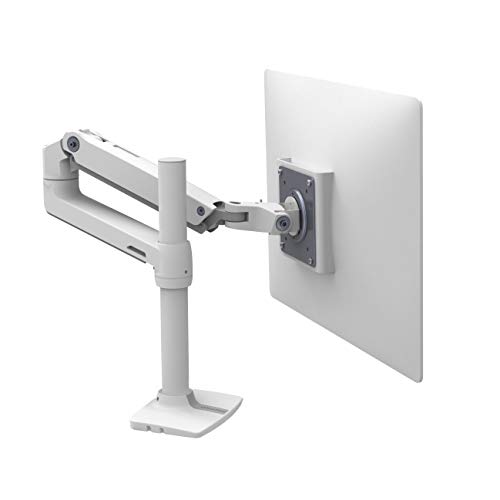
Ergotron LX Monitor Arm
Premium PickThe Ergotron LX is the gold standard for office monitor arms — smooth Constant Force technology, a clean white or black finish, and compatibility with monitors up to 34 inches.
The Chair: Built for Long Sessions#
Developers sit for extended periods and often lean forward during intense debugging or code reviews. Your chair must support this posture without forcing you into a fixed position.
The Herman Miller Aeron is our standard recommendation for developers. The mesh construction breathes well during long sessions, the PostureFit SL system supports your lumbar whether you are leaning back or sitting upright, and the 12-year warranty covers the daily wear that developer chairs accumulate.
For developers who prefer a less clinical aesthetic, the Secretlab Titan Evo offers genuine lumbar support with a magnetic headrest for those moments when you need to lean back and think through a problem.
The Desk: Height Adjustability for Standing Debugging#
Standing desks are especially valuable for developers because they break the sitting pattern during the part of the day when you are least productive sitting down. Many developers find that standing during code reviews, documentation reading, and planning sessions keeps them more engaged than sitting through the same tasks.
A dual-motor standing desk with a programmable memory controller lets you switch between sitting and standing heights with a single button press. Program your standing height, your sitting height, and one intermediate perching height for variety throughout the day.
Lighting for Code Readability#
Code readability is a function of contrast, font size, and ambient lighting. A monitor light bar illuminates your desk surface and keyboard without creating glare on your screen, which is critical during late-night coding sessions when ambient room light is low.
The BenQ ScreenBar Halo is our top recommendation for developers because the rear ambient glow reduces the contrast between your bright IDE and the dark room, which is the primary cause of eye fatigue during extended evening sessions.
Developer-Specific Accessories#
External numpad for data work#
If your primary keyboard is a 75 percent or smaller layout, keep a wireless numpad in your drawer for the occasional data entry or calculation task. It adds numpad functionality when needed without consuming desk space permanently.
USB-C hub or dock#
Most developer laptops have limited ports. A USB-C dock centralizes your monitor connections, ethernet, and peripheral USB ports into a single cable to your laptop. This transforms your laptop into a desktop workstation instantly when you sit down, and returns it to a portable machine when you unplug.
Headphones#
Noise-canceling headphones are essential for focus work. They block household noise during deep coding sessions and signal to family members or roommates that you are in focus mode.
The Developer Desk Setup Checklist#
- Mechanical keyboard with 75 percent or smaller layout and QMK/VIA support
- 27-inch or larger 4K monitor (single) or dual monitors on independent arms
- Ergonomic chair with adjustable lumbar and a 10-plus-year warranty
- Sit-stand desk with dual motors and programmable height presets
- Monitor light bar with auto-dimming for day-to-night transitions
- USB-C dock for single-cable laptop connection
- Cable management tray and velcro ties for a clean under-desk
This setup is designed to support 10-plus-hour days without the physical strain that accumulates from suboptimal equipment. Every item on this list is a professional tool that pays for itself through improved comfort, reduced fatigue, and sustained focus over the long coding sessions that define development work.