The short answer: the top of your screen should sit at or slightly below your eye level when you are sitting upright. The screen should be about 20 to 30 inches from your face, roughly an arm's length, and tilted back about 10 to 20 degrees so the surface faces your eyes squarely. Get those three things right and your head stays balanced over your spine instead of drifting forward and down.
Most people set their monitor too low. The screen sits flat on the desk, you look down at it all day, and your neck slowly pays for it. The fix is usually a few inches of lift and a small tilt, not a new chair or a new desk. Below is the simple rule, the reason it works, how to measure it for your own height, and the cheapest way to actually get there.
The Simple Rule and Why Your Neck Cares#
Here is the rule in one line: your eyes should land on a point near the top of the screen when you look straight ahead. From there your natural gaze drifts down a few degrees to the center of the display, which is exactly where you want it.
The reason comes down to how much your head weighs and how far it tilts. Your head is roughly 10 to 12 pounds. When it sits balanced over your neck, the muscles barely work. But every degree you tilt your head forward increases the load those muscles have to hold. A widely cited biomechanical modeling study estimated that the effective load on the neck more than doubles, to roughly 27 pounds, at just 15 degrees of forward tilt, and keeps climbing as the head drops further (Hansraj, Surgical Technology International). Hold that for eight hours a day and the strain adds up into the stiff, achy neck a lot of desk workers know well.
A screen at eye level keeps your head upright. A screen too low pulls your chin down and your head forward, one of the most common ergonomic mistakes at any desk. Eye level is the target because it lets you keep a neutral neck while still looking slightly downward, which is the most comfortable angle for your eyes.
How to Measure It for Your Height#
You do not need a tape measure on the wall. You need your own seated posture. Sit the way you actually work: back supported, feet flat, shoulders relaxed.
- Look straight ahead at the wall behind your monitor. The spot your eyes naturally hit is your eye level.
- The top edge of your screen should sit at that line or about 1 to 2 inches below it.
- Check the distance. Reach out an arm. Your fingertips should roughly graze the screen. That puts you in the 20 to 30 inch range, where text is readable without leaning in.
- Tilt the top of the screen away from you by about 10 to 20 degrees so the glass faces your eyes head on and cuts glare.
These numbers line up with OSHA's monitor guidance, which puts the top line of the screen at or below eye level, a preferred viewing distance of 20 to 40 inches, and a tilt of no more than 10 to 20 degrees.
A few adjustments by body type. If you are tall, you will likely need more lift than you expect, since desks are built around an average height. If you wear progressive or bifocal lenses, you may want the screen a touch lower than the standard rule, because you read through the bottom of the lens and a lower screen keeps you from tipping your head back. OSHA flags the same issue and suggests lowering the monitor and tilting it toward you. And if you run a larger panel, a 32-inch or wider screen, aim for the eye-level rule based on the top quarter of the display rather than the very top edge.
The Common Mistakes#
Monitor too low is the big one, and it hides in plain sight. A bare monitor on a stock stand almost always lands below eye level for an average adult. It looks fine because you adapt to it, but your neck is doing quiet work all day.
A few others worth checking:
- Screen too far back, so you lean in and crane forward to read, which cancels out any height gain.
- Screen too close, under about 18 inches, which forces your eyes to strain to focus and can leave them tired by afternoon. The American Optometric Association suggests 20 to 28 inches from the eyes.
- Too much upward tilt, where the bottom of the screen juts toward you. That faces the panel at the ceiling, not your eyes, and often catches overhead glare.
- A laptop used as a primary display with no riser. This is its own problem, and it deserves its own section.
Laptops and Dual Monitors#
A laptop is an ergonomic compromise by design. The screen and keyboard are bolted together, so when the screen is at the right height the keyboard is too high, and when the keyboard is comfortable the screen is far too low. You cannot win with the laptop alone.
The fix is to raise the laptop until its screen hits eye level, then plug in a separate keyboard and mouse so your hands return to a neutral position. A stand or riser does the lifting. Once you add an external display, treat the laptop as the secondary screen and put the external monitor in the primary eye-level position in front of you.
Dual monitors add one decision: are the two screens equal, or is one primary? If you spend most of your time on one screen, center that one in front of you at eye level and angle the second one in beside it. If you split your time evenly, place the two screens so the seam between them is centered on your nose, with both angled slightly inward like an open book. Keep the tops of both panels at the same height so your eyes are not climbing a staircase every time you glance across.
How to Actually Raise It#
You have two practical paths, and the right one depends on how much you want to fiddle with position.
A riser or shelf is the simplest. You set the monitor on a raised platform and you are done. It is cheap, sturdy, and it doubles as storage for whatever lives under the screen. The tradeoff is that the height is fixed, so measure before you buy and pick one that lands your screen at eye level rather than guessing. Our desk shelves and risers guide walks through sizing and the better-built options. If you want a few inches of lift with some adjustability, a riser with multiple height settings takes the guesswork out.

WALI Monitor Stand Riser
Best ValueA 3-height-adjustable metal monitor riser (3.9"–5.5") with a ventilated platform, rubber non-slip pads, under-shelf storage, and a 10-year warranty with US-based support — outstanding value.
A monitor arm gives you full control. It clamps to the desk edge and lets you move the screen up, down, forward, back, and into a tilt on the fly, which is ideal if you switch between sitting and standing or share the desk. It also clears the desk surface underneath. Arms cost more and take a few minutes to install, but the adjustability is worth it for most people who work at a screen all day. See our best monitor arms guide for the picks we trust, and our monitor arm reviews for the detailed specs on each one. A single arm with smooth, easy height adjustment is the best fit if you switch between sitting and standing.
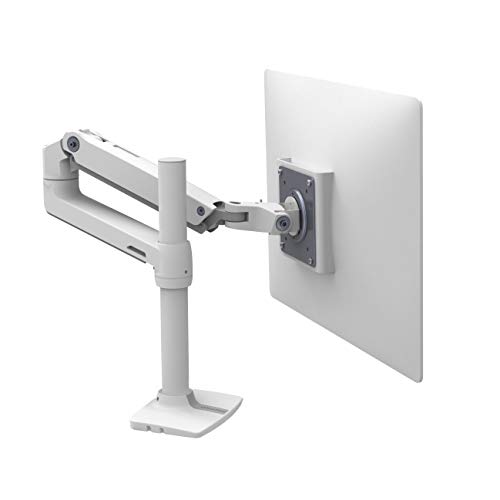
Ergotron LX Monitor Arm
Premium PickThe Ergotron LX is the gold standard for office monitor arms — smooth Constant Force technology, a clean white or black finish, and compatibility with monitors up to 34 inches.
Whichever you choose, set the height once with the measuring steps above, then leave it. The goal is a position your body settles into without thinking.
The Bottom Line#
Put the top of your screen at or just below eye level, sit it about 20 to 30 inches away, and tilt it back 10 to 20 degrees. That keeps your head balanced over your spine instead of hanging forward, which is what spares your neck over a long day. Most desks leave the screen too low, so the usual fix is a few inches of lift from a riser or the full adjustability of an arm.
Monitor height is one piece of a larger setup. If you want to dial in your chair, desk, and keyboard position too, our complete work-from-home ergonomics guide covers the rest. But if you only change one thing today, raise your screen.