A walking pad is a flat, motorized treadmill with no handrails that slides under a standing desk so you can stroll slowly while you work. The pitch is simple: instead of sitting still for eight hours, you rack up thousands of low-effort steps during meetings, email, and reading. That pitch is mostly true. What gets oversold is everything around it.
This is the honest version. A walking pad will not transform your body on its own, and a cheap one can be a noisy nuisance you stop using by week three. But for the right person, in the right room, with the right expectations, it is one of the few fitness purchases that quietly works because it fits into hours you were going to waste anyway. Here is who that person is, and who you are if you should keep your money.
The Real Benefits#
The biggest win is volume of movement you would never have done otherwise. You are not carving out a separate hour to exercise. You are converting dead desk time into walking time. If you spend three or four hours a day on calls and low-focus tasks, walking at a slow pace during them can add several thousand steps to your daily total without a single dedicated workout. For a lot of desk workers, that is the difference between 3,000 steps a day and 8,000.
The second win is breaking up sitting. There is solid evidence that long, unbroken sitting is bad for you somewhat independently of how much you exercise otherwise. A walking pad makes it easy to interrupt those long blocks. Even if you only use it in 20-minute stretches a few times a day, you are getting up, moving blood, and resetting your posture far more often than you would otherwise.
The third, quieter benefit is mood and focus. Many people find that gentle movement during routine work makes them less restless and more able to sit through a boring meeting, because they are not fighting the urge to fidget. It is not a guaranteed productivity hack, but it is a real and common experience.
If you want the numbers behind the calorie side of things, we break that down in our piece on how many calories a walking pad actually burns.
The Honest Downsides#
Storage is the first reality check. Even the slim folding models are still a slab roughly the length of your stride and the width of your shoulders. When you are not using it, it has to go somewhere, and sliding it under a desk only works if your desk has the clearance and your floor is clear. In a small apartment, that slab becomes furniture you trip over.
Noise is the second, and it is where cheap units fall apart. A good motor at slow speeds is genuinely quiet enough for a call. A budget motor under load can hum, whine, or develop a rhythmic thud that your microphone will happily broadcast to your coworkers. If you plan to walk during meetings, motor quality is not optional, and it is the main thing you are paying for in the better models.
Third, and most important: you walk slowly. The whole point is that you can type and think while you move, which means a pace of roughly 1 to 2 miles per hour. That is a stroll. It burns real but modest calories, it does almost nothing for cardiovascular fitness, and it will not build strength. A walking pad is a tool for adding daily movement, not a replacement for cardio, lifting, or actual exercise. Anyone selling it as a workout machine is stretching the truth.
Fourth, there is a learning curve to working while walking. Fine motor tasks like precise mouse work, detailed design, or anything requiring stillness are harder in motion. Most people end up walking during calls, reading, and email, and stepping off for focused heads-down work. That is fine, but it means the pad is useful for part of your day, not all of it.
Who It Is Genuinely Worth It For#
It is worth it if you already work a desk job, already struggle to hit a step count you are happy with, and have a standing desk or are willing to get one. If your work is full of meetings, reading, and routine tasks, you have hours of compatible time every day, and the pad will pay off in movement you will actually accumulate.
It is worth it if you have a dedicated home office or a room with floor space and a door, so noise and storage are not a daily battle. And it is worth it if you are realistic: you want to add easy daily movement on top of whatever real exercise you do, not instead of it.
If that sounds like you, the pad almost always needs a height-adjustable surface to work over, so it is worth reading our standing desks guide alongside this, or comparing models in our standing desk reviews. The two are a package.
Who Should Skip It#
Skip it if your desk is tiny or wedged into a corner with no room for a slab underneath and no place to stand it when you are done. The friction of dragging it out every day is the single most common reason these things end up unused.
Skip it if what you actually want is cardio or weight loss as the main event. A walking pad supports those goals at the margins, but if you are buying it to get fit, you will be disappointed and you would get far more from running shoes, a bike, or a gym membership. Runners in particular should know these pads are not built for running and usually cap out well below jogging speed.
And skip it, honestly, if you suspect you will not use it. If you already own resistance bands you never touch and a yoga mat gathering dust, a walking pad is a bigger, more expensive version of the same gamble. Be honest with yourself before you spend the money.
How to Walk and Work Without Losing Focus#
If you do buy one, expect your first session to go badly. Most people step on expecting to glide through their inbox at 3 mph, watch their typing fall apart, and step off after ten minutes. That is normal. Walking while you work is a skill, and the learning curve is short if you give it a little structure.
Match your pace to the task. One speed is not right for everything:
- Typing and close reading: 1 to 2 mph. Your upper body stays steady enough to type accurately and your eyes can track text without bouncing. Most of your walking time will be here.
- Calls, listening, and reading on a large screen: up to 2.5 or 3 mph, especially on audio-only calls.
- Precision work: step off. Cell-by-cell spreadsheet edits, fine design work, careful code review, and anything where one wrong character costs you belong at a seated desk.
Set your desk height on the deck, not beside it. The treadmill lifts you a few inches, so a desk set for standing on the floor will be too low once you step on. Raise it until your elbows sit at roughly 90 degrees with flat, neutral wrists, measured while standing on the pad. Keep the top of the screen at or just below eye level; laptops usually end up too low, so a monitor arm or riser helps.
Protect your typing accuracy. When typos creep in, drop to 1 mph or slightly under, since a slower stride means less torso sway. Plant your wrists and use fuller, more deliberate keystrokes; the small twitchy ones that work seated turn into errors on a moving platform. Within a week or two your body learns to stabilize and you stop noticing.
Ease in. Start with 15 to 20 minutes once or twice a day at a slow pace, and add five or ten minutes every few days. Most people reach a couple of hours of accumulated walking across a workday within two or three weeks, in chunks rather than one long march. Aching arches or hot spots mean you need better shoes, not more willpower.
Anchor walking to specific tasks, and leave the pad set up. The best predictor of use is whether the pad lives in your walking spot rather than a closet; the moment it needs hauling out, usage drops off a cliff. Then pick two or three recurring anchors, such as every meeting where you are not sharing your screen, your reading queue, or clearing Slack and email. Call starts, you step on. The decision disappears.
Get the gear right so nothing fights you: a quiet motor for meetings, a desk with enough height range to clear the deck, and supportive shoes. If you want help choosing the unit itself, start with our best under-desk treadmills guide, our detailed walking pad reviews, or the Walking Pad Finder to narrow it down by your space and budget.
If storage is your main worry, a compact, no-assembly pad like this one is built to slide under a desk and out of the way.
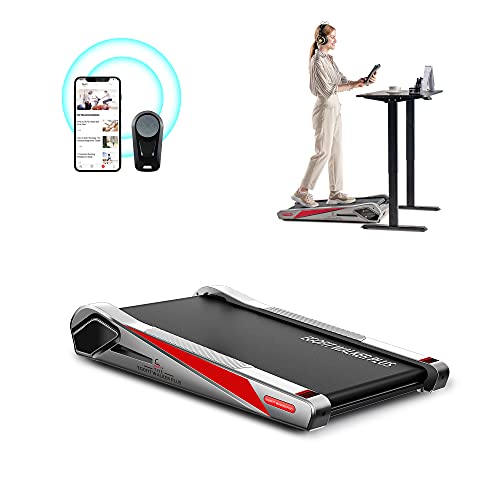
Egofit Walker Pro M1 Walking Pad
One of the most compact under-desk walking pads, with no assembly needed, an LCD display, and a steel frame rated for 220 lbs — built for small apartments and desks.
Common Questions#
What is the difference between a walking pad and a treadmill desk? A walking pad is just the belt: a thin, rail-free slab you slide under any standing desk and walk on at roughly 1 to 4 mph. A treadmill desk usually means the whole combination of a walking surface plus a desk, or a taller under-desk treadmill with a fold-up handrail that can also run. The walking pad is cheaper, lower-profile, and more flexible because you pair it with a desk you already own; the all-in-one is bulkier but ready to go. For most desk workers who already have a standing desk, the walking pad is the practical pick.
Are a walking pad and an under-desk treadmill the same thing? Mostly, with a size split. "Walking pad" describes the slim, walk-only slabs with no handrail, while "under-desk treadmill" often means the same thing but can also include a slightly larger 2-in-1 with a fold-up rail and a running mode. If you only walk during work, a pure walking pad is thinner and easier to store; if you want to jog too, step up to a 2-in-1. Our under-desk treadmill reviews break down specific models and specs.
If you want the 2-in-1 route, this model folds between a flat walking pad and a running mode with a safety handle.

UREVO Strol 2E Smart 2-in-1 Folding Treadmill (URTM030)
The best 2-in-1 for people who also want to run. The Strol 2E folds between a flat walking pad (0.6–4 mph) and a running mode with a safety handle up to 6.2 mph, with a dual LED display, app control, and a 5-layer belt on 8 silicone shock absorbers, backed by a large owner base.
The Bottom Line#
A walking pad is worth it if you are a desk worker with the floor space and the honest intention to use it, and you understand exactly what you are buying: a way to convert wasted sitting hours into thousands of easy steps. It is not a cardio machine, not a weight-loss device, and not a fix for a sedentary life all by itself. It is a movement multiplier for hours you would otherwise spend motionless.
If that matches your situation, it is one of the rare purchases that delivers quietly for years. If it does not, no amount of clever marketing will change the fact that a slab in the closet does nothing. Buy it for the right reasons, set it up where you will use it, and keep your expectations grounded.