Choosing an under-desk treadmill comes down to three things: whether your desk can rise high enough to clear the deck, whether the pad is quiet enough for the way you actually work, and whether you need a walk-only slab or a machine that can also run. Get those three right and almost any well-built walking pad will serve you for years; get one wrong and it ends up leaning against a wall.
Want our ranked shortlist? See the best under-desk treadmills.
This guide is the step before the shortlist. It covers what to measure in your room, the trade-offs between walk-only, incline, and 2-in-1 designs, what you gain as you move up in budget, and the mistakes that make people regret the purchase.
What to Measure Before You Buy#
Your desk's height range#
A walking pad lifts you off the floor by the height of its deck, usually around 4 to 5 inches. That means your desk has to rise 4 to 5 inches above your normal standing height, not just reach it. Stand in the shoes you'll walk in, bend your elbows to about 90 degrees, and measure from the floor to your forearm. Add the pad's deck height. If that number is above your desk's maximum height, you'll be typing with your shoulders hunched, and no pad will fix it. Check this first, because it rules out more setups than any spec on the pad itself. If your desk falls short, see our standing desk reviews for frames with a taller range.
Floor space, including the zone behind you#
Measure the footprint the pad needs while in use, then add space behind it. Most treadmill manuals specify a clear zone behind the belt so that a stumble doesn't send you into a wall, a chair, or a radiator. Under a standing desk, the front of the deck sits under the desktop and your chair has to go somewhere else while you walk, so plan where the chair parks. Also measure where the pad will live when it's not in use: under a couch, under a bed, or upright in a closet. A flat, no-fold slab is easy to slide away only if the gap under your furniture is taller than the deck.
Flooring and neighbors#
Hard floors are the easy case. On carpet, a treadmill mat under the pad keeps it stable, keeps carpet fibers away from the motor's air intake, and helps the deck sit level. In an apartment, think about the people below: footfall and motor vibration travel through the floor even when the pad sounds quiet in the room. A dense rubber mat is the cheapest fix for both problems, so budget space for one.
Power#
Walking pad manuals commonly tell you to plug the motor directly into a wall outlet rather than through an extension cord or a crowded power strip. Check that you have an outlet within reach of where the pad will sit without stretching the cord across your walking path.
Your weight and stride#
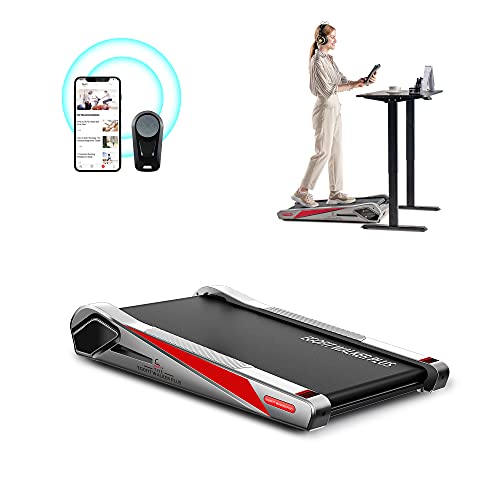
Compare your bodyweight with the pad's rated capacity and leave real headroom, since capacity reflects how hard the frame and motor are working, not just whether the pad holds you. If you're tall, measure the belt length on the spec sheet: a shorter deck forces a shorter stride as you speed up. Compact pads like the Egofit Walker Pro M1 trade belt length for footprint, which suits small apartments and shorter strides but not long-legged walkers.
The Decision Axes and Trade-Offs#
Walk-only vs 2-in-1#
This is the biggest fork. A walk-only pad is flat, rail-free, and built for the slow speeds where you can still read and type. A 2-in-1 adds a fold-up handle and a running mode, which makes it taller and heavier. The UREVO Strol 2E, for example, runs 0.6 to 4 mph as a flat pad and up to 6.2 mph with the handle raised. Buy the 2-in-1 only if running is a real plan, not a someday idea. Paying for a running mode you never use is the most common over-purchase in this category.
Incline or flat#
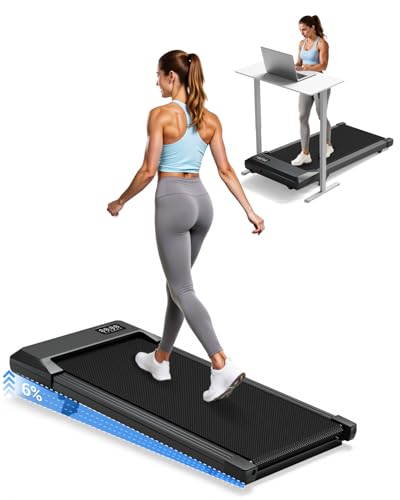
Incline makes slow walking harder work without speeding up, which is useful if you want more effort while still typing at a gentle pace. The cost is extra deck height at the front, and often a manual adjustment rather than a motorized one. The Superun BA10-B, for instance, lists a 6% manual incline. If your desk is already near the top of its range, the extra height from incline can be the thing that breaks the fit.
App, remote, or on-deck controls#
Most pads ship with a small remote and an LED display; some add an app. Apps like SunnyFit, PitPat, and UREVO Sport log distance and steps, which helps if tracking keeps you motivated. If you just want to walk, the remote matters more: you'll change speed constantly between typing and thinking, so a remote that sits on the desk and responds reliably is worth more than a feature list.
Assembled slab vs desk-included machine#
Most walking pads arrive ready to use. A few machines, like the Acezoe P20-2, bolt a height-adjustable desk workstation onto the treadmill itself. That is a real option if you don't own a standing desk, but it's heavier, bulkier, and harder to move or store than a slab you slide under existing furniture.
Budget Tiers: What You Gain at Each Level#
Budget. Expect a walk-only slab with a 2.5 HP-class motor, a speed range topping out around 4 mph, a remote, and no assembly. Owner bases are usually smaller and support from lesser-known brands can be thin. Pads like the Vhorilix XM-A1 or the Akluer incline pad sit here. Fine for walking between meetings; check capacity and deck length carefully.
Mid-range. You gain a longer track record, a bigger owner base, a better app, and often a quieter spec. This is also where budget-friendly incline and well-reviewed 2-in-1 models live. For most desk workers, the sweet spot.
Premium. You gain running speeds, steeper incline ranges, more workout programs, higher weight capacity, and in some cases an integrated desk. You also gain weight and bulk. Only worth it if you'll genuinely use the extra range.
Common Mistakes to Avoid#
- Skipping the desk-height check. The single most common reason a pad goes unused is that the desk can't rise high enough above the deck for comfortable typing.
- Walking too fast while working. Typing accuracy drops as pace climbs. Most people settle into a slow, steady pace for focused work and save brisker walking for calls and reading. Start slow and work up.
- Treating noise as a room problem only. A pad that's soft in the room can still transmit vibration to the floor below or hum into a sensitive mic as speed rises.
- Buying for capacity right at your weight. Leave headroom; a motor working at its limit runs hotter and wears faster.
- Ignoring maintenance. Many walking pad manuals call for periodic belt lubrication with silicone and occasional belt tension or centering adjustments. A dry or drifting belt gets louder and wears the motor.
- Over-buying features. Running modes and steep incline add height, weight, and cost. Buy for how you'll actually move.
Picks by Need#
These picks are chosen to illustrate each type of buyer above. For the full ranked list, see the review page linked at the end.
For walking through calls in a typical home office#
The Sunny Treadpad 100 ships fully assembled, has a 41-inch deck, and syncs to the SunnyFit app over Wi-Fi and Bluetooth. It's walk-only and capped at 245 lbs, so it suits the median desk worker rather than heavier users or runners.

Sunny Health & Fitness Treadpad 100 (SF-T724064)
Editor’s ChoiceOne of the most popular walking pads, with a large owner base. A no-assembly, slide-under-the-desk slab with Wi-Fi and Bluetooth SunnyFit app tracking, a 41-inch deck, shock-absorbing cushioning, and a remote — the safe default for a home office.
For more effort without a bigger machine#
The Superun BA10-B adds a 6% manual incline to a 35-lb frame rated for 300 lbs, and the maker lists it at under 45 dB. A good fit if you want harder walks at a slow, typing-friendly pace.
Superun BA10-B Walking Pad with Incline
The best budget incline pad. At 35 lbs with a 6% manual incline, a 2.5HP motor, 300 lb capacity, and a 5-layer shock belt, the Superun BA10-B adds calorie-burning incline and PitPat app tracking at a budget price while staying under 45 dB for calls.
For small apartments and short strides#
The Egofit Walker Pro M1 is one of the most compact pads in the category, with no assembly and a steel frame rated for 220 lbs. Choose it when floor and storage space matter more than deck length.
Egofit Walker Pro M1 Walking Pad
One of the most compact under-desk walking pads, with no assembly needed, an LCD display, and a steel frame rated for 220 lbs — built for small apartments and desks.
For walking at the desk and running after work#
The UREVO Strol 2E folds between a flat 0.6 to 4 mph walking pad and a 6.2 mph running mode with the handle raised. Expect more height and weight than a pure slab.

UREVO Strol 2E Smart 2-in-1 Folding Treadmill (URTM030)
The best 2-in-1 for people who also want to run. The Strol 2E folds between a flat walking pad (0.6–4 mph) and a running mode with a safety handle up to 6.2 mph, with a dual LED display, app control, and a 5-layer belt on 8 silicone shock absorbers, backed by a large owner base.
For people without a standing desk#
The Acezoe P20-2 includes a removable, height-adjustable desk workstation, 0 to 10% manual incline, and a 7.5 mph top speed. It replaces two purchases, at the cost of being the heaviest and bulkiest option here.

Acezoe P20-2 3-in-1 Treadmill with Desk Workstation
Premium PickThe premium pick with a desk built in. The Acezoe P20-2 mounts a removable, height-adjustable desk workstation over a 3-in-1 treadmill with 0–10% manual incline, a 7-layer belt on double shock absorption, a 7.5 mph top speed, 12 workout programs, and 300 lb capacity.
Frequently Asked Questions#
How fast should you walk on a walking pad while working?#
Slower than you think. For typing and focused reading, most people find a gentle pace, around 1 to 2 mph, keeps their hands steady and their attention on the screen. Speed up for calls you mostly listen to, or for breaks between tasks, and drop back down when you need precision.
Can you put a walking pad on carpet?#
Yes, but put a treadmill mat underneath. A mat gives the pad a firm, level base, keeps carpet fibers and dust away from the motor's air intake, and reduces vibration traveling through the floor. On thick or plush carpet a mat is close to essential.
Do walking pads need maintenance?#
A little. Many manuals call for applying silicone lubricant under the belt at set intervals and checking that the belt stays centered and properly tensioned. Wipe dust from around the motor housing and keep the area under the pad clean. Follow the schedule in your model's manual, since intervals vary by brand.
Can I use a walking pad without a standing desk?#
Not comfortably with a fixed-height desk, because the deck lifts you 4 to 5 inches and a normal sitting desk is far too low for walking. Your options are a height-adjustable desk with enough range, or a machine with an integrated desk like the Acezoe P20-2. Some people use a tall counter for reading or calls, but it rarely works for sustained typing.
Ready to compare specific models? See our ranked best under-desk treadmills, and read are walking pads worth it if you're still on the fence.