Three things decide whether a standing desk works for you: a height range that fits your body both seated and standing, a frame stable enough for the gear you actually put on it, and a desktop sized to your room and screens. Get those three right and almost everything else, from keypad style to finish color, is preference. Get one wrong and you end up with a desk you stop adjusting after the first month.
This guide is about choosing, not ranking. If you want our ranked shortlist with full specs and pros and cons, see the best standing desks. Here we walk through what to measure before you shop, the trade-offs between frame types, the mistakes that catch most first-time buyers, and which desk suits which kind of setup.
Start With Three Measurements#
Spec sheets only help once you know your own numbers. Take these three before you look at a single listing.
Your seated and standing desk heights#
Sit in your chair with your feet flat, shoulders relaxed, and elbows bent to roughly 90 degrees. Measure from the floor to the underside of your forearm. That is your seated desk height, minus about an inch if your keyboard is thick. Then stand in the shoes you usually wear at your desk and repeat. That is your standing height.
As a rough guide, typical numbers look like this:
- Around 5 feet tall: seated near 23 to 24 inches, standing near 36 to 37 inches.
- Around 5 feet 6 inches: seated near 26 to 27 inches, standing near 41 inches.
- Around 6 feet: seated near 28 to 29 inches, standing near 44 to 45 inches.
- Around 6 feet 4 inches: seated near 30 inches, standing near 47 to 48 inches.
Now compare both numbers against the desk's listed range. The minimum matters as much as the maximum. A frame that bottoms out at 28 inches is too tall for many shorter users when seated, and they end up shrugging their shoulders all day. A frame that tops out around 46 inches leaves a tall user hunched when standing. Leave an inch or two of margin at each end, because the listed range is usually measured without the desktop thickness or with a specific top.
Your gear load#
Add up what will sit on the desk: monitors, a monitor arm, a laptop or desktop PC, speakers, a lamp, and anything you lean on. A pair of monitors on a dual arm can easily reach 40 pounds before anything else goes on. Then check whether the desk's capacity rating includes the desktop itself; some do and some do not, and a heavy solid-wood or bamboo top can eat a meaningful share of a single-motor frame's budget. Aim to load the frame to no more than about two-thirds of its rated capacity so the motors are not working at their limit every time you press a button.
Your room#
Measure the floor space, but also the vertical space. At standing height, will the desk hit a windowsill, a wall shelf, or the bottom of a wall-mounted TV? Will the back edge clear a radiator? Check that your power outlet is close enough that cables can travel the full height range, which on most frames means 20 inches or more of slack. And note the floor: thick carpet makes any desk feel less planted, while uneven floors need the leveling feet most frames include.
The Decision Axes and Their Trade-Offs#
Single motor vs dual motor#
A single motor drives both legs through a shared shaft. It keeps the cost down and works well for a laptop or a single monitor, but it lifts more slowly and tends to sway more at full height, particularly with weight off-center. A dual-motor frame puts a motor in each leg, lifts faster, typically carries more weight, and stays steadier when you type at standing height. If you run two monitors, lean on the desk, or stand for long stretches, the dual-motor frame is the safer choice.
Some single-motor desks are better than others. The FlexiSpot EN1, for example, is a single-motor frame, but its one-piece top avoids the seam that splice-board budget desks have down the middle, which helps it feel more solid than its motor type suggests.
Two-stage vs three-stage legs#
Two-stage legs have two telescoping sections and suit most people between roughly 5 feet 4 inches and 6 feet 1 inch. Three-stage legs add a third section, which widens the range at both ends: they usually go lower when seated and higher when standing. If you are at either end of the height spectrum, or several people of different heights share the desk, a three-stage frame is worth prioritizing.
Desktop size, shape, and material#
Width follows your screens: around 48 inches suits one monitor and a laptop, 55 inches fits two monitors comfortably, and 60 inches or more gives a full multi-monitor workstation room to breathe. Depth matters more than people expect. A 24-inch depth puts a monitor close to your face unless you use an arm; 28 to 30 inches gives a healthier viewing distance on the stand alone.
Material is a trade-off between feel and practicality. Laminate is light and durable. One-piece tops avoid the center seam of splice boards. Solid bamboo and butcher block feel like furniture and hold clamp-mounted accessories well, but they are heavier and need occasional care.
Full desk, frame only, or converter#
A complete desk is the simplest route. A frame-only base makes sense if you already own a good tabletop or want a size or material most desks do not offer. A converter sits on your existing desk and lifts your monitor and keyboard, which avoids replacing furniture but eats desk depth and is usually manual. A converter is a reasonable way to find out whether you will actually stand before committing to a full desk.
Budget Tiers, Explained Without Price Tags#
Entry level desks are usually single-motor, two-stage frames with laminate or splice-board tops and a modest capacity. They give you genuine electric sit-stand and work well for a laptop or one monitor. Expect slower travel and more sway at full height.
Mid-range desks are where dual motors and three-stage legs start to appear, along with one-piece or solid tops, better capacity ratings, and longer frame and motor warranties. This is where most people with a dual-monitor setup should land.
Premium desks add heavier tops, faster and quieter dual motors, refined assembly systems, and longer warranties. You are paying for stillness, speed, and longevity rather than new features.
Whatever tier you shop in, read the warranty terms closely. Coverage on the frame, the motors, and the electronics is often listed separately, and the motor term is the one that matters most.
Common Mistakes to Avoid#
- Checking only the maximum height. Shorter users are more often let down by a high minimum than tall users are by a low maximum.
- Ignoring depth. A wide, shallow desk can leave your monitor uncomfortably close. Depth decides viewing distance.
- Underestimating weight. Monitor arms, a desktop PC, and a heavy top add up fast. Leave headroom.
- Forgetting cable travel. A desk that rises 20 inches will yank a short power cord or monitor cable out of the wall. Plan slack and use a cable tray.
- Skipping the presets. A desk without memory presets takes more effort to adjust, and more effort means fewer adjustments. Program seated and standing heights on day one.
- Buying a drawer without checking knee clearance. Built-in drawers reduce the space under the desk at seated height.
- Assuming standing all day is the goal. The benefit comes from changing position regularly, which is why a smooth, quick frame matters more than a high one.
Picks by Need#
For tall users and dual monitors: the FlexiSpot E6 Bamboo combines dual motors, a three-stage frame that reaches close to 49 inches, a 220-pound capacity, and a 55 by 28 inch solid bamboo top. FlexiSpot backs the frame and motors with a five-year warranty.

FlexiSpot E6 Bamboo Standing Desk 55×28
A premium FSC-certified solid-bamboo desktop (stronger than steel by tensile strength) with dual motors, 45dB whisper-quiet operation, 220 lb capacity, a 23.6"–49.2" height range, and a 5-year frame/motor warranty.
For a premium, long-term workstation: the Vari Classic 60x30 pairs a dual-motor lift with a thick one-piece butcher-block top and a 200-pound capacity. Vari rates its quick-attach assembly at under ten minutes, which is unusual for a desk this size.

Vari Classic Electric Standing Desk 60×30
Editor’s ChoiceThe Vari Classic is the premium pick — a thick one-piece butcher-block top, dual-motor lift, 200 lb capacity, 4 memory presets, and patented under-10-minute assembly. Top-tier build for serious home offices.
If you already own a tabletop: the VIVO DESK-E200B is a dual-motor steel frame rated for 220 pounds that accepts tops from 40 to 77 inches wide. Note its listed minimum height of about 28.5 inches, which suits average and taller users better than shorter ones.
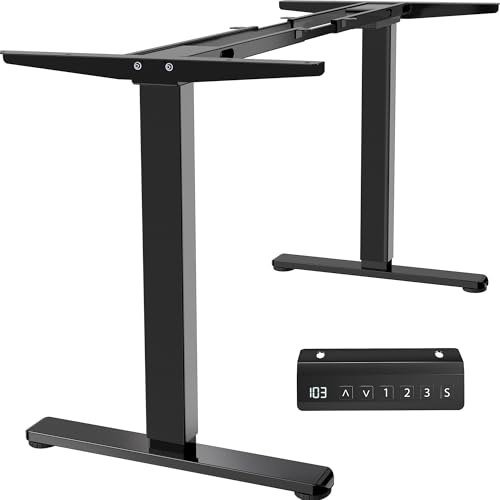
VIVO DESK-E200B Dual Motor Standing Desk Frame
A frame-only dual-motor standing desk base for a tabletop you already own: all-steel construction, memory presets, a 220 lb capacity, and support for tops from 40 to 77 inches wide.
For a small room or a light setup: the FlexiSpot EN1 48x24 is a compact single-motor desk with a one-piece top, four memory presets, and a 176-pound capacity. It is a good fit for a laptop and one monitor in a tight corner.
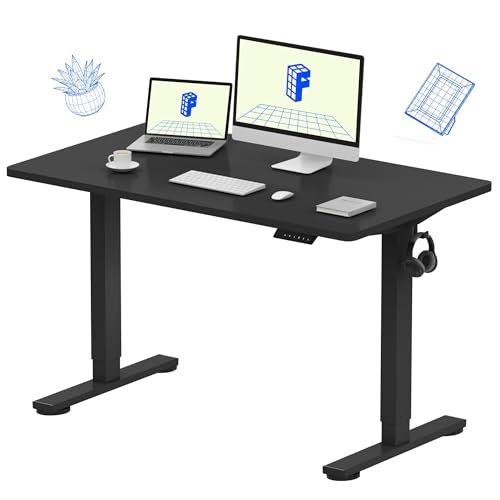
FlexiSpot EN1 Standing Desk 48×24
The FlexiSpot EN1 pairs a seamless one-piece desktop with quiet electric height adjustment and 4 memory presets — rock-solid, wobble-free stability that handles dual monitors with ease.
If you rent or want to try standing first: the VIVO DESK-V000K converter sits on your current desk, with a 31.5-inch top, a separate keyboard tray, and a lift-assisted rise for up to 33 pounds.

VIVO 32" Standing Desk Converter (DESK-V000K)
Best ValueA sit-stand converter that sits on your existing desk: a 31.5-inch top with a separate keyboard tray, gas-spring lift for up to 33 lbs, and 4.5 to 20 inches of height adjustment — no new desk required.
Frequently Asked Questions#
Is a standing desk converter as good as a full standing desk?#
Not for most daily users. A converter is cheaper and needs no new furniture, but it takes up desk depth, is usually manual, and has a low weight limit, so heavy dual-monitor setups are out. It works well as a trial run or for renters. If you already know you will switch positions several times a day, a full electric desk is the better long-term buy.
Why does my standing desk wobble, and how do I reduce it?#
Wobble usually comes from a combination of tall extension, single-motor frames, off-center loads, and soft floors. To reduce it, tighten all frame bolts after the first week, adjust the leveling feet, move heavy gear toward the center, and avoid thick carpet or put a rigid mat under the feet. If you are buying new, dual motors, wider feet, and a crossbar or cross-brace design all help.
Can I put a standing desk on carpet?#
Yes, but expect a little more movement than on a hard floor, especially at full height. Low-pile carpet is usually fine. On thick carpet, a rigid floor protector under the desk gives the feet a firm base. Avoid casters on carpet unless they lock firmly.
How much weight capacity do I really need?#
Total up your gear and the desktop if the rating includes it, then add a healthy margin. A laptop and one monitor fit easily on a typical single-motor frame. Two or more monitors on an arm, a desktop PC, and a solid-wood top push you toward a dual-motor frame rated around 200 pounds or more.
Next Step#
Once you know your heights, your load, and your space, the shortlist narrows quickly. Compare the ranked picks, specs, and owner-reported trade-offs on our best standing desks page, or, if you are working to a firm budget, see our budget standing desk guide.