The 10 Best
Webcams
of 2026, researched and compared.
The short answer: The Logitech Brio 4K is our top pick for remote workers who want sharp 4K video and Windows Hello sign-in from a dependable brand. Streamers chasing the best image should look at the Razer Kiyo Pro Ultra and its large sensor. On a budget, the Logitech C920S HD Pro Webcam remains a reliable 1080p choice with a privacy shutter.
The shortlist
Scan our top 10 picks. Tap a row to jump to the full review, or check the price on Amazon.
Check Amazon for current pricing and availability. As an Amazon Associate we earn from qualifying purchases.
| Product | Best for | ||
|---|---|---|---|
| 01 |  Logitech Brio 4KEditor’s Choice | Editor’s Choice | Check Price |
| 02 |  Razer Kiyo Pro Ultra | — | Check Price |
| 03 |  Elgato Facecam MK.2Premium Pick | Premium Pick | Check Price |
| 04 |  Logitech C920x HD Pro Webcam | — | Check Price |
| 05 |  Logitech MX Brio 4K Webcam | — | Check Price |
| 06 |  Logitech C920S HD Pro WebcamBest Value | Best Value | Check Price |
| 07 |  Logitech C922x Pro Stream Webcam | — | Check Price |
| 08 |  NexiGo N930AF 1080p Autofocus WebcamBest Value | Best Value | Check Price |
| 09 |  EMEET C960 1080p WebcamBest Value | Best Value | Check Price |
| 10 |  Anker PowerConf C200 2K Webcam | — | Check Price |
Logitech Brio 4KRazer Kiyo Pro UltraElgato Facecam MK.2Logitech C920x HD Pro WebcamLogitech MX Brio 4K WebcamLogitech C920S HD Pro WebcamLogitech C922x Pro Stream WebcamNexiGo N930AF 1080p Autofocus WebcamEMEET C960 1080p WebcamAnker PowerConf C200 2K WebcamProduct details via Amazon Creators API. Check Amazon for current price and availability.

Review · 01
Logitech Brio 4K
The Logitech Brio 4K is the best all-around webcam for professionals — delivering 4K/30fps video, HDR, and excellent RightLight 3 low-light performance in a compact form factor.
What We Love
- 4K/30fps output sets the standard for webcam resolution in 2026
- RightLight 3 HDR handles backlit and mixed lighting scenarios automatically
- Integrated IR login works seamlessly with Windows Hello for fast sign-in
Reasons to Skip
- 4K streaming requires a modern host computer with USB 3.0 for full quality
- Background replacement performance lags dedicated virtual camera software
The Numbers
“The Logitech Brio 4K is the best all-around webcam for professionals — delivering 4K/30fps video, HDR, and excellent RightLight 3 low-light performance in a compact form factor.”

Review · 02
Razer Kiyo Pro Ultra
The Razer Kiyo Pro Ultra leads the category in low-light performance thanks to its 2.1-inch 1/1.2" Sony STARVIS 2 sensor — a sensor size unmatched in webcam hardware.
What We Love
- 1/1.2" Sony STARVIS 2 sensor captures extraordinary detail in dark conditions
- Fast f/1.7 lens for natural background blur and low-light video
- 4K/30fps with HDR delivers broadcast-quality video for high-end streaming rigs
Reasons to Skip
- The most expensive webcam on this list by a significant margin
- Synapse software has historically been resource-intensive on Windows machines
The Numbers
“The Razer Kiyo Pro Ultra leads the category in low-light performance thanks to its 2.1-inch 1/1.2" Sony STARVIS 2 sensor — a sensor size unmatched in webcam hardware.”

Review · 03
Elgato Facecam MK.2
The Elgato Facecam MK.2 gives content creators and streamers full manual camera controls — aperture, shutter speed, and color grading — in a plug-and-play USB-C package.
What We Love
- DSLR-style image controls in Elgato Camera Hub
- Fixed focus prime lens eliminates autofocus hunting during recording
- Compact design that mounts on a monitor or tripod
Reasons to Skip
- Fixed focus is a limitation for setups where head distance from the camera varies
- 1080p/60fps ceiling means it doesn't match Logitech Brio's 4K output
The Numbers
“The Elgato Facecam MK.2 gives content creators and streamers full manual camera controls — aperture, shutter speed, and color grading — in a plug-and-play USB-C package.”

Review · 04
Logitech C920x HD Pro Webcam
The Logitech C920x is the gold-standard 1080p/30fps webcam — a five-element glass lens, dual stereo noise-reducing mics, and HD auto light correction that just works on every platform.
What We Love
- Proven 1080p/30fps quality trusted by millions
- Five-element glass lens with auto light correction
- Dual stereo noise-reducing microphones
Reasons to Skip
- 1080p only, no 4K
- Fixed field of view
The Numbers
“The Logitech C920x is the gold-standard 1080p/30fps webcam — a five-element glass lens, dual stereo noise-reducing mics, and HD auto light correction that just works on every platform.”

Review · 05
Logitech MX Brio 4K Webcam
The Logitech MX Brio is a premium 4K webcam with 70% larger pixels, AI-enhanced image quality, dual beamforming noise-reducing mics, Show Mode for desk sharing, and a built-in privacy cover.
What We Love
- Ultra HD 4K with 70% larger pixels
- AI-enhanced image quality in tough light
- Show Mode for sharing your desk, USB-C
Reasons to Skip
- Premium price
- 4K capture needs a capable PC
The Numbers
“The Logitech MX Brio is a premium 4K webcam with 70% larger pixels, AI-enhanced image quality, dual beamforming noise-reducing mics, Show Mode for desk sharing, and a built-in privacy cover.”

Review · 06
Logitech C920S HD Pro Webcam
The proven 1080p/30fps work webcam with a glass lens, stereo mics, automatic light correction, and a privacy shutter — the dependable, affordable pick for daily video calls.
What We Love
- Sharp 1080p with glass lens
- Built-in privacy shutter
- Plug-and-play on any platform
Reasons to Skip
- Struggles in very dim rooms
- No 4K or HDR
The Numbers
“The proven 1080p/30fps work webcam with a glass lens, stereo mics, automatic light correction, and a privacy shutter — the dependable, affordable pick for daily video calls.”

Review · 07
Logitech C922x Pro Stream Webcam
Logitech's long-running 1080p webcam with autofocus, HD light correction, and a 720p/60fps mode for smoother motion — a step up from the C920 for streamers and frequent callers.
What We Love
- 1080p/30 or 720p/60fps
- Autofocus and light correction
- Works with Teams, Meet, and Zoom
Reasons to Skip
- No 4K
- No privacy shutter
The Numbers
“Logitech's long-running 1080p webcam with autofocus, HD light correction, and a 720p/60fps mode for smoother motion — a step up from the C920 for streamers and frequent callers.”
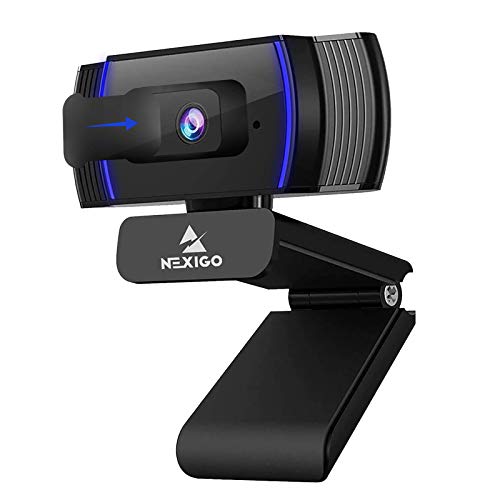
Review · 08
NexiGo N930AF 1080p Autofocus Webcam
An inexpensive 1080p/30fps webcam with autofocus, a noise-reducing built-in mic, and a privacy cover — a budget upgrade over a blurry laptop camera for daily calls.
What We Love
- Autofocus at a budget price
- Privacy cover included
- Plug-and-play USB
Reasons to Skip
- Struggles in dim light
- Built-in mic is basic
The Numbers
“An inexpensive 1080p/30fps webcam with autofocus, a noise-reducing built-in mic, and a privacy cover — a budget upgrade over a blurry laptop camera for daily calls.”

Review · 09
EMEET C960 1080p Webcam
One of the most-owned budget webcams: 1080p video with automatic light adjustment, two built-in mics, a 90° field of view, and a privacy cover — a cheap, plug-and-play fix for a bad laptop camera.
What We Love
- Very low price
- Two built-in mics
- Privacy cover and plug-and-play USB
Reasons to Skip
- Fixed focus — soft when you lean in
- Image gets grainy in dim rooms
The Numbers
“One of the most-owned budget webcams: 1080p video with automatic light adjustment, two built-in mics, a 90° field of view, and a privacy cover — a cheap, plug-and-play fix for a bad laptop camera.”
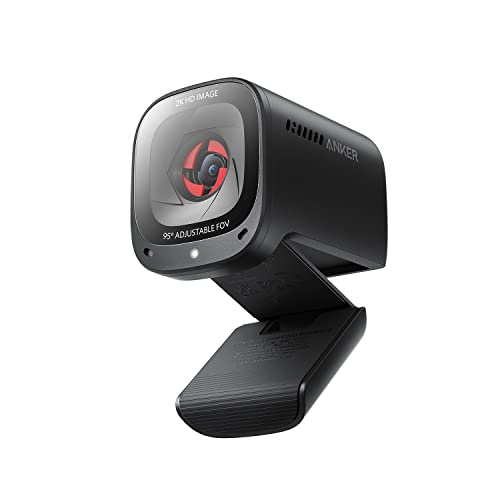
Review · 10
Anker PowerConf C200 2K Webcam
A 2K webcam with low-light correction and dual AI noise-cancelling mics, built for calls in imperfect home-office lighting — a sharper step up from 1080p budget cameras.
What We Love
- 2K resolution
- Good low-light correction
- Dual mics with AI noise cancellation
Reasons to Skip
- Software needed for advanced settings
- No autofocus face tracking
The Numbers
“A 2K webcam with low-light correction and dual AI noise-cancelling mics, built for calls in imperfect home-office lighting — a sharper step up from 1080p budget cameras.”
How We Judge Webcams
Resolution: 1080p vs. 4K
For standard video calls, 1080p at 30 fps is the practical sweet spot — most conferencing platforms compress higher resolutions anyway. 4K webcams shine for content creators and streamers who need the extra detail for cropping and digital zoom. If your internet upload speed is under 10 Mbps, a 4K webcam will still be sending a compressed 1080p stream, making the premium less justifiable for meetings.
Low-Light Performance and Sensor Size
Home offices frequently suffer from mixed or insufficient lighting. Webcams with larger sensors (1/2.8-inch or bigger) and wide apertures (f/2.0 or lower) capture significantly more light, producing cleaner images without aggressive noise reduction that smears detail. Look for models with dedicated low-light correction modes. A good sensor saves you from needing a ring light in most conditions.
Autofocus and Field of View
Fast, reliable autofocus keeps you sharp even when you lean in or gesture. Fixed-focus webcams are cheaper but blur at close distances. A 78–90 degree field of view works well for solo calls, while wider angles (up to 120 degrees) suit conference rooms. Be cautious with very wide FOVs — they can distort edges and reveal more of your background than you might want.
Microphone Quality and Privacy
Built-in webcam microphones have improved significantly, with many models now offering dual omnidirectional or beamforming arrays with noise cancellation. However, a dedicated USB microphone still outperforms any webcam mic for voice clarity. Privacy shutters are increasingly standard and give you physical assurance that the camera is off. Some webcams also include indicator LEDs for additional security.