Picking a desk size sounds simple until you have one in the room and realize it is either swallowing the wall or too cramped to hold your monitor at a comfortable distance. Most people are well served by a width somewhere between forty-eight and sixty inches, paired with a depth of at least twenty-four to thirty inches so your screen can sit far enough from your eyes. Those are starting points, not rules. The size that works for you depends on how many monitors you run, what else lives on the surface, and how much floor you can give up to the desk and the chair behind it.
This guide walks through the numbers that actually matter: how deep the desk needs to be for comfortable viewing, how wide it should be for your screens and tasks, how much clearance to leave in the room, what a standing-desk frame adds to the footprint, and how to measure your space before you buy anything.
Depth and Monitor Viewing Distance#
Depth is the dimension people get wrong most often. A desk that is too shallow forces your monitor close to your face, which strains your eyes and pushes your keyboard against the edge. For a comfortable setup you want the front of your screen roughly an arm's length away, which for most people is about twenty to thirty inches from your eyes.
A depth of twenty-four inches is the practical floor. It works for a single monitor on a stand, but it leaves little room for a keyboard, a mug, and your forearms all at once. If you can, aim for a depth of twenty-eight to thirty inches. That extra few inches lets you slide the monitor back, rest your wrists on the surface, and keep clutter from crowding the screen. Deep monitors with large stands eat into this space fast, so measure the stand's footprint, not just the panel.
If your desk is shallower than you would like, you can buy back the depth by getting the monitor off the surface entirely. A clamp-mounted monitor arm pushes the screen back over the rear edge and frees the space underneath. See the monitor arms guide for reclaiming depth on a desk that cannot grow any deeper.
Width by Number of Monitors and Tasks#
Width is where your monitor count and your daily tasks decide the number. A single monitor and a laptop are happy on a desk that is forty-two to forty-eight inches wide. That gives you the screen in front of you, the laptop off to one side, and room for a notebook without things touching.
Two monitors change the math. A pair of twenty-four-inch screens side by side spans close to forty-three inches on their own, so you want a desk that is at least fifty-five to sixty inches wide to hold them plus your keyboard and mouse without the edges hanging off. Twenty-seven-inch monitors push that closer to sixty-three to seventy-two inches. If you also do hands-on work, such as sketching, writing by hand, or spreading out paperwork, add another twelve inches of clear surface beside the screens so you have somewhere to actually work.
A good way to sanity-check width is to measure your monitors edge to edge, add your keyboard width, then add at least eighteen inches of breathing room. If the total is wider than the desk you are eyeing, the desk is too small.
Leaving Clearance and Walkways in the Room#
A desk does not live in isolation. Behind it sits a chair, and behind the chair you need room to push back, stand up, and walk away. Plan for at least thirty-six inches of clear floor behind the desk for the chair and your movement. In a tight room you can drop to about thirty inches, but anything less and you will be squeezing past furniture every time you stand.
If the desk sits in a walkway or a shared room, keep a path of at least thirty inches wide so people can pass without turning sideways. Corner desks need special care: measure both walls and remember that the diagonal point sticks out further into the room than the wall lengths suggest. Sketch the desk's footprint on the floor with painter's tape before you commit, then sit in a chair inside the taped outline and see whether you can move freely.
Standing-Desk Footprint and Frame Width#
Standing desks add a variable that fixed desks do not have: the frame. The motorized legs and crossbar set a minimum and maximum width for the tabletop, and they sit a few inches in from each end. Most single-motor and dual-motor frames adjust to fit tops between about forty-three and seventy-one inches wide, so confirm your chosen top falls inside that range before buying.
The frame also adds depth and weight you should account for. The feet typically run twenty-four to twenty-eight inches front to back, which means a standing desk needs roughly the same floor depth as its tabletop, plus clearance for cables and the control box underneath. Because the whole surface rises, give yourself headroom too: at full height a tall top can reach forty-eight to fifty inches off the floor, so check that nothing above the desk, such as a shelf or a sloped ceiling, gets in the way. For frame width ranges, weight ratings, and stability notes, read the standing desks guide and compare specific models in our standing desk reviews.
For a single-monitor setup, a 48-by-24-inch top on an electric frame is a compact starting point.
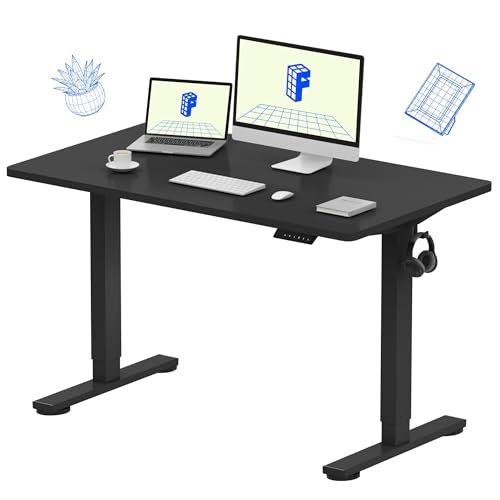
FlexiSpot EN1 Standing Desk 48×24
The FlexiSpot EN1 pairs a seamless one-piece desktop with quiet electric height adjustment and 4 memory presets — rock-solid, wobble-free stability that handles dual monitors with ease.
For dual monitors, a 55-by-28-inch top gets you much closer to the width and depth recommended above.

FlexiSpot EN1 Standing Desk 55×28
A wide 55×28 one-piece seamless desktop with a 1"-thick surface for superior rigidity, 4 memory presets, and 176 lb capacity — ideal for dual-monitor power users who need a larger work surface.
Measuring Before You Buy#
The cheapest mistake to avoid is the one you catch with a tape measure. Before you order, measure the wall or nook where the desk will go, width and depth both, and write the numbers down. Subtract a few inches on each side so the desk is not jammed wall to wall, since you need room for cables and air behind it.
Next, measure what goes on top. Lay a tape measure across your monitors edge to edge, note your keyboard and mouse area, and add space for anything else you keep within reach. Then measure the floor behind the desk for your chair and walkway clearance. With those three sets of numbers, the width and depth you should be shopping for become obvious, and you can ignore any desk that does not fit.
One last check: measure your doorways and the path into the room. A desk that fits the wall perfectly is useless if the box will not make it through the door or up the stairs. Many larger tops ship in pieces for this reason, but it is worth confirming before delivery day.
The Bottom Line#
Start with a depth of at least twenty-eight to thirty inches so your monitor sits a comfortable arm's length away, then size the width to your screens and tasks, from about forty-eight inches for a single monitor up to seventy-two inches for dual twenty-seven-inch displays with workspace to spare. Leave at least thirty-six inches of clearance behind the chair, confirm a standing-desk frame matches your tabletop, and measure the room, the gear, and the doorway before you buy. Get those numbers right and the desk you choose will feel right the day it arrives and every day after.