You have probably been told to sit up straight your whole life. Shoulders back, spine ramrod stiff, chin tucked, hold it there for eight hours. It feels virtuous, and it is almost completely wrong. Holding any single rigid position, including a textbook-perfect upright one, loads the same muscles and discs in the same way for hours on end. That static loading is closer to the actual problem than the solution.
What the research consensus actually points to is simpler and more forgiving. Good desk posture is a relaxed neutral spine that you can move within, not a pose you lock into. Neutral means your joints sit near the middle of their comfortable range rather than at the extremes, so no single structure carries an outsized share of the load. Get the neutral baseline right, then keep changing it. This guide walks through what neutral looks like joint by joint, why movement beats any one position, and the small mistakes that quietly pull you out of alignment.
What a Neutral Spine and Neutral Joints Actually Look Like#
Neutral is a set of relaxed angles, not a rigid stack. Working from the ground up, here is the baseline most ergonomics guidance converges on, including OSHA's neutral working postures for computer users.
Your feet should be fully supported, flat on the floor or on a footrest, so your thighs are roughly parallel to the ground. Dangling feet drag the weight of your legs onto the front edge of the seat and into your lower back. Your hips should be at or slightly above your knees, opening the hip angle a little past 90 degrees. That slightly open angle, often around 100 to 110 degrees, encourages your pelvis to sit upright rather than rolling backward and flattening the natural inward curve of your lower spine.
Your lower back keeps its gentle inward curve, supported rather than forced. Your elbows hang close to your sides and bend to roughly 90 degrees, give or take, so your forearms are about level with the desk and your shoulders can stay down and relaxed instead of creeping up toward your ears. Wrists stay straight and neutral, not cocked up or bent down as you type. Finally, the top of your screen should sit at or just below eye level, about an arm's length away, so your head balances over your shoulders instead of jutting forward. A forward head is expensive: a widely cited biomechanical modeling study estimated that the load on the neck climbs from about 10 to 12 pounds with the head balanced to roughly 27 pounds at just 15 degrees of forward tilt, and keeps rising from there (Hansraj, Surgical Technology International).
None of these numbers are laws. They are a starting zone. If your elbows feel better at 100 degrees, that is fine. The point is to land near the middle of each joint's range, not pinned at an extreme.
Why the Best Posture Is Your Next Posture#
Here is the single most useful idea in all of this: the best posture is your next posture. Even a flawless neutral position becomes a problem if you hold it long enough. OSHA makes the same point, advising computer users to change working position frequently because even a good posture is unhealthy when held for long periods (OSHA). Static postures restrict blood flow, fatigue the postural muscles that are quietly working to hold you in place, and keep steady pressure on the same spinal discs. The body is built to move, and prolonged stillness in any shape is what tends to produce that end-of-day stiffness and ache.
This reframes the whole goal. You are not hunting for one magic position to defend all day. You are setting up a comfortable neutral baseline and then constantly making small departures from it: shifting your weight, reclining for a while, standing up, leaning back to think, then returning to neutral. Movement is the active ingredient. A good setup is not one that locks you into ideal alignment; it is one that makes a wide range of comfortable positions easy to flow between. If you want the full system around this idea, our complete WFH ergonomics guide puts movement at the center rather than treating it as an afterthought.
How the Chair and Desk Enable Neutral#
Your furniture does not create good posture, but it determines how easy or impossible neutral is to reach. The chair's job is to support your neutral spine without forcing it and to let you move freely. That means a seat height that lets your feet rest flat with hips slightly open, a seat depth that leaves a couple of fingers of space behind your knees, and lumbar support that meets the curve of your lower back rather than shoving it forward. A recline function matters more than people expect, because reclining slightly transfers load off your spine and is one of the easiest position changes to make without leaving your desk.
The desk sets your arm and screen geometry. At the right height, your elbows fall to about 90 degrees with shoulders relaxed and forearms roughly level with the surface. Too high and your shoulders shrug up all day; too low and you hunch down to reach. A separate monitor, or a laptop on a stand paired with an external keyboard, lets you fix screen height and arm height independently, which a bare laptop simply cannot do. For a step-by-step way to dial in every measurement, work through the ergonomic desk setup checklist. And because the chair carries so much of the load, it is worth choosing carefully: see how the leading options stack up in our ergonomic chairs guide and our detailed ergonomic chair reviews.
If movement is the goal, look for a chair whose backrest follows you as you shift and recline rather than locking you into one position.
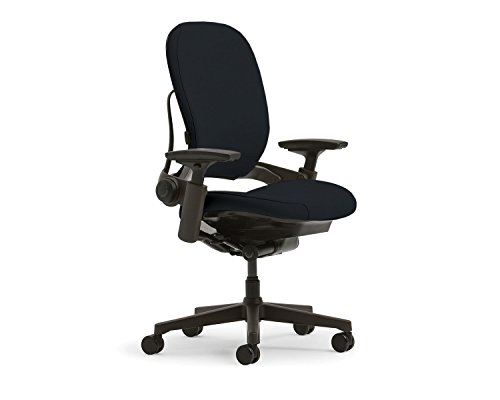
Steelcase Leap V2
Premium PickThe Steelcase Leap V2 uses a patented LiveBack technology that mirrors your spine's movement in real time, making it the best chair for people who shift posture constantly.
The Common Mistakes That Pull You Out of Neutral#
Most posture problems are not dramatic. They are small, repeated drifts that you stop noticing within minutes of sitting down.
The laptop hunch is the most common by far. Because a laptop screen and keyboard are fixed a few inches apart, you cannot get both right at once. Raise the screen and your hands are too high; lower it for your hands and your neck bends down to read. The default outcome is a chin-forward, rounded-shoulder slump. The fix is to stop using the laptop as your only surface for long sessions: lift the screen and add an external keyboard and mouse.
An adjustable laptop stand is the simplest way to bring the screen up toward eye level.

Nulaxy C1 Laptop Stand
Best ValueA highly rated dual-shaft aluminum laptop stand with 7-level height adjustment (3.15"–10.6"), built-in heat ventilation, silicone scratch protection, and tool-free adjustment.
Perching forward is the second. People slide to the front edge of the seat, abandon the backrest, and hover there with no support, which loads the lower back and the postural muscles continuously. Sit back and let the chair do its job. Other frequent drifts include cradling a phone between ear and shoulder, a screen pushed off to one side that keeps your neck rotated, armrests set too high so your shoulders ride up, and a screen placed too far back so your head creeps forward to read it. Each one is a small departure from neutral that becomes costly only because you hold it for hours.
Building Movement Into the Day#
Since movement is the real lever, the practical question is how to get more of it without derailing your work. The aim is frequent low-effort changes, not a rigid schedule you will abandon by Wednesday.
A simple rule of thumb comes from Cornell ergonomist Alan Hedge: in each half hour, aim for roughly 20 minutes of sitting, 8 minutes of standing, and 2 minutes of moving (Cornell University Ergonomics Web). Treat those numbers as a ballpark, not a stopwatch. Even without a sit-stand desk, get fully out of your chair every half hour or so, even if only for a minute or two. Stand for a phone call. Walk to refill your water rather than keeping a jug at your desk. If you have a sit-stand desk, alternate between sitting and standing across the day instead of trying to stand for hours at once, which just swaps one static posture for another. Take stairs, walk during meetings that do not need a screen, and use natural breakpoints in your work as cues to reset. Stacking these small movements onto things you already do is what makes them stick.
The Bottom Line#
Good desk posture is not a rigid upright pose you white-knuckle through the day. It is a relaxed neutral baseline that you keep moving within. Set the angles in the comfortable middle of their range, feet supported, hips slightly open, elbows near 90 degrees, screen at eye level, then treat that as home base rather than a prison. Let a well-fitted chair and a correctly sized desk make neutral effortless, watch for the small drifts like the laptop hunch and the forward perch, and above all keep changing position. The healthiest posture is the one you are about to move into next.