Three things matter most when you choose an ergonomic chair: fit, adjustability, and how the chair moves with you. Fit means the seat height, seat depth, and width match your body. Adjustability means you can place the lumbar support and armrests where your body needs them, not where the designer guessed. Movement means the backrest supports you as you shift and recline through the day, because nobody holds one perfect posture for eight hours.
This is a guide to choosing, not a ranked list. If you want our ranked shortlist with full specs and pros and cons, see the best ergonomic chairs. Here we cover the measurements to take before you shop, the trade-offs that separate one chair from another, the mistakes that make an expensive chair feel wrong, and which chair suits which kind of sitter.
Measure Yourself Before You Shop#
A chair that fits someone else perfectly can be wrong for you. Five quick measurements tell you which spec sheets to take seriously.
Lower-leg height#
Sit on a firm surface with your knees at about 90 degrees and measure from the floor to the crease behind your knee, wearing the shoes you normally work in. Your chair's seat should be able to sit at roughly that height. Most adults land somewhere between about 15 and 21 inches. If your number sits near either end, check the chair's seat height range closely, since many chairs cover the middle well and the extremes poorly. Shorter users whose desk is too high may also need a footrest.
Thigh length#
Measure from the back of your hips to the back of your knee while seated. Chairs with a sliding seat pan let you match the seat to this length; fixed seats only fit a band of users. If your thighs are notably long or short, an adjustable seat depth moves from nice-to-have to essential. The Steelcase Leap V2, for example, lists a seat depth range of 15.5 to 18.5 inches.
Hip width#
Measure across the widest part of your hips while seated. Then compare it to the seat width and, more importantly, the space between the armrests at their narrowest. Armrests that pinch your hips push you to sit forward on the seat and away from the backrest, which defeats the lumbar support.
Torso and lumbar position#
Sit upright and find the deepest point of the curve in your lower back, usually just above your belt line. That is where the lumbar support should land. Measure from the seat to that point. Chairs with height-adjustable lumbar can meet you there; fixed-lumbar chairs only work if your torso happens to match.
Your desk height and body weight#
Note the height of your desk surface. Your armrests need to drop low enough to slide under it, or flip up out of the way, so you can pull in close. And check the chair's weight rating against your body weight with real margin, since chairs loaded near their limit wear their cylinders and tilt mechanisms faster.
The Decision Axes and Their Trade-Offs#
Mesh, foam, or hybrid#
Mesh breathes and stays cool, which matters in warm rooms and long sessions. It can feel firm at first, and cheaper mesh seats can develop a hard edge under the thighs. Foam feels softer and spreads pressure evenly but holds heat. Many chairs combine a mesh back with a foam seat to get airflow where you sweat and cushioning where you sit.
Fixed vs dynamic lumbar support#
Fixed lumbar curves suit the average back. Adjustable pads let you set height and sometimes depth. Dynamic systems go further: the Herman Miller Aeron Remastered uses PostureFit SL, which supports both the sacrum and the lumbar region, while the Steelcase Leap V2 uses LiveBack, a flexing backrest that changes shape as you move. If you have a history of lower-back discomfort, prioritize lumbar you can actually adjust.
Armrest adjustability#
Basic armrests move only up and down. 3D arms add depth or pivot, and 4D arms add width as well. More adjustment helps you keep your shoulders relaxed and your elbows near 90 degrees whether you are typing, using a mouse, or leaning back on a call. Flip-up arms are a separate benefit: they let the chair slide fully under a desk in a small room.
Headrest or no headrest#
A headrest earns its place if you recline often, take long calls leaning back, or watch video between tasks. If you sit upright and type most of the day, it barely touches your head. Poorly placed headrests can also push your head forward or hit your shoulders, so adjustability matters more than presence.
Recline and tilt#
A tilt lock with several positions lets you lean back and hold a posture without fighting tension. Look for tension control so the backrest matches your body weight. Wide recline ranges, like the 85 to 165 degrees Secretlab lists for the Titan Evo, suit people who alternate between work and rest in the same chair.
Budget Tiers, Explained Without Price Tags#
Budget chairs usually offer a mesh back, built-in or simple adjustable lumbar, height-adjustable or flip-up arms, and a basic tilt lock. Seat depth is usually fixed, and warranties are short. They are a real upgrade over a kitchen chair or a generic office chair, as long as your body fits their fixed dimensions.
Mid-range chairs add more adjustment: 3D arms, adjustable headrests, multi-position tilt locks, certified components, and higher weight ratings. This is a sensible tier for most home offices.
Premium chairs add adjustable seat depth, sophisticated lumbar systems, multiple sizes, long warranties, and materials designed to last a decade or more. Herman Miller and Steelcase both offer 12-year warranties on the Aeron and Leap V2. If you sit six or more hours a day, the cost per year of use is what to compare, not the sticker. Refurbished premium chairs are a common middle path.
Common Mistakes to Avoid#
- Buying for looks or brand alone. A famous chair in the wrong size still fits badly. The Aeron comes in sizes A, B, and C for a reason.
- Ignoring seat depth. A seat that is too deep presses into the backs of your knees; too shallow and your thighs are unsupported.
- Setting the chair once and never again. Most people never touch the lumbar or tilt tension. Spend ten minutes adjusting, then fine-tune over the first week.
- Raising the chair to match a high desk. If your feet leave the floor, lower the chair and add a footrest or lower the desk instead.
- Choosing a gaming chair for its looks. Some, like the Titan Evo, offer genuine lumbar adjustment. Many cheaper ones rely on loose pillows and stiff bucket seats.
- Overlooking armrest clearance. Arms that cannot drop below your desk keep you from pulling in, so you end up reaching forward.
- Expecting a chair to fix everything. Monitor height, keyboard position, and regular movement matter as much as the chair.
Picks by Need#
For long sessions in warm rooms: the Herman Miller Aeron Remastered uses 8Z Pellicle mesh across the seat and back, PostureFit SL sacral and lumbar support, three sizes, and a 12-year warranty. It has no headrest in the standard configuration.
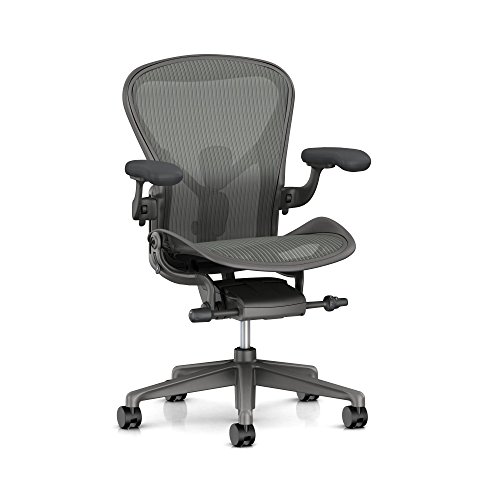
Herman Miller Aeron
Editor’s ChoiceThe Herman Miller Aeron is the definitive ergonomic chair — a 30-year-old design that still sets the benchmark for lumbar support, breathability, and long-session comfort.
For people who shift posture constantly: the Steelcase Leap V2 pairs LiveBack with lower-back firmness control, an adjustable seat depth, and a 400-pound rating. Its Natural Glide System lets you recline without sliding away from your desk.
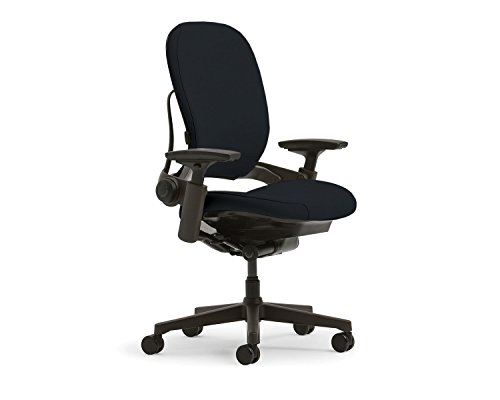
Steelcase Leap V2
Premium PickThe Steelcase Leap V2 uses a patented LiveBack technology that mirrors your spine's movement in real time, making it the best chair for people who shift posture constantly.
If you want a headrest and a deep recline: the Secretlab Titan Evo 2022 offers a magnetic memory foam headrest, 4-way L-ADAPT lumbar, a wide recline range, and S, R, and XL sizes to match different builds.

Secretlab Titan Evo 2022
The Secretlab Titan Evo 2022 bridges the gap between gaming aesthetics and genuine ergonomic engineering, featuring a magnetic memory foam headrest and 4-way lumbar support.
For a complete mid-range package: the Staples Dexley combines a mesh back and seat, 3D arms, a height- and angle-adjustable headrest, a three-position tilt lock, and a 275-pound rating.

Staples Dexley Ergonomic Task Chair
A complete ergonomic package from a trusted office brand — full breathable mesh back and seat, 3D adjustable armrests, a height- and angle-adjustable headrest, 3-position tilt lock, and 275 lb capacity.
For a small room on a budget: the GABRYLLY Ergonomic Mesh Chair adds an adjustable headrest and lumbar support, plus flip-up arms so it slides fully under a desk. The maker sizes it for roughly 5 feet 2 inches to 6 feet 1 inch, and its seat depth is fixed.

GABRYLLY Ergonomic Mesh Office Chair
Best ValueA high-back mesh office chair with an adjustable headrest and lumbar support, flip-up armrests that let it slide under a desk, a 90–120° tilt lock, and a wide seat for larger builds.
Frequently Asked Questions#
Do I need a headrest on an office chair?#
Only if you recline. If you lean back during calls, reading, or breaks, a well-placed headrest takes load off your neck. If you sit upright and type most of the day, your head rarely reaches it. When you do want one, choose a headrest that adjusts in height and angle so it meets the back of your head rather than pushing it forward.
Is a gaming chair good for office work?#
Some are, many are not. Gaming chairs with genuine adjustable lumbar, proper sizing, and breathable fabric, like the Secretlab Titan Evo, work well for full workdays. Cheaper models often use bucket-shaped seats, loose lumbar pillows, and hot synthetic leather. Judge any chair by its adjustments and fit, not its styling.
Is a refurbished ergonomic chair worth buying?#
Often, yes. Premium chairs are built for heavy commercial use, and refurbished units from reputable sellers typically replace worn parts such as cylinders, arm pads, and seat foam. Check what warranty the refurbisher offers, since the original manufacturer's warranty may not transfer, and confirm the size and options match what you need.
Which ergonomic chair features matter most for short or tall people?#
Seat height range and seat depth come first. Shorter users need a low minimum seat height and a shallow seat, and may need a footrest. Taller users need a high maximum seat height, a deep or sliding seat, and a tall backrest that reaches their shoulder blades. Chairs offered in multiple sizes, such as the Aeron or Titan Evo, make it easier to get a proper fit at either end.
Next Step#
Once you know your measurements and the trade-offs you care about, compare the ranked picks, full specs, and owner-reported pros and cons on our best ergonomic chairs page.