Choosing desk speakers comes down to three things: how much room you have on and under the desk, how you will connect them to your computer and phone, and whether you want accurate sound or bass-forward fun. Get those three right and almost any well-built powered pair will be a huge step up from laptop or monitor speakers; get them wrong and even an excellent pair will sound boomy, hum, or crowd your desk.
Want our ranked shortlist? See the best desk speakers.
This guide skips the basics our review page already covers and goes one level deeper: what to measure before you buy, how desk placement changes what a spec sheet promises, and the setup mistakes that quietly ruin good speakers.
What to Measure Before You Buy#
Desk width and depth#
Speakers sound best when the two cabinets and your head form a rough triangle, which usually means the speakers sit somewhere around three to four feet apart, one on each side of your monitor. Measure the free space to the left and right of your screen, not just the total desk width. A typical bookshelf speaker is about six inches wide and eight to ten inches deep per side, and studio monitors with four-inch woofers run a little larger. If you have less than about seven inches of clear space on each side of the monitor, look at compact desktop speakers instead of full bookshelf cabinets.
Depth matters as much as width. A deep cabinet on a shallow desk pushes your keyboard toward you or forces the speakers behind the monitor, where the screen blocks the sound. Check the depth spec against the gap between your monitor stand and the desk edge.
Floor space for a subwoofer#
If you are considering a 2.1 system, look under the desk now. A subwoofer needs a spot on the floor where you will not kick it, plus a cable run to the satellites and a power outlet. Side-firing and down-firing subs, like the ones in the Klipsch ProMedia 2.1 and Logitech Z407, also need a few inches of clearance on the firing side to work properly.
Ear height and distance from the wall#
Tweeters should point at your ears, not your chest. Sitting flat on a desk, most speakers aim several inches too low, so plan for stands, isolation pads, or a speaker shelf from the start. Also check where the bass port is: rear-ported speakers pushed tight against a wall can sound boomy, so leave a few inches behind them. If your desk is jammed against a wall with no room to pull it forward, a front-ported or sealed design is the easier fit.
Your sources#
List every device you want to play through the speakers: desktop, laptop, phone, console, turntable, audio interface. Then count the outputs each one has. This list decides more than the sound quality does, because a speaker without the right input is simply the wrong speaker.
The Decision Axes and Trade-offs#
Tuning: accurate or fun#
Studio monitors such as the PreSonus Eris 3.5 Gen 2 and Edifier MR4 are tuned close to flat, which is what you want for editing audio or video. Consumer bookshelf and 2.1 systems usually lift the bass and treble so music and games feel bigger. Neither is better in the abstract. The useful middle ground is a monitor with tuning controls: the Mackie CR3.5 has a Tone Knob that moves from a transparent reference sound to a bass-boosted one, and a Location Switch for desktop versus bookshelf placement.
Connection type: analog, USB, or Bluetooth#
Analog inputs (3.5mm, RCA, and balanced TRS) use your computer or interface to convert the digital signal. A built-in USB DAC, like the one in the Kanto YU2, takes the digital signal directly and does the conversion inside the speaker, which can sidestep a noisy onboard headphone jack. Bluetooth is the convenient phone option, but it adds a delay that can be noticeable in games and video on some devices, and quality depends on the codec. The Edifier R1700BTs supports aptX HD, which helps if your phone supports it too.
Expansion: subwoofer output or not#
A subwoofer output lets you start with a 2.0 pair and add bass later without replacing anything. The Edifier R1700BTs and Kanto YU2 both list a sub out, and PreSonus lists the Eris 3.5 Gen 2 as compatible with its Eris Sub 8BT. If you are unsure whether you will want more low end, this is a cheap way to keep the option open.
Controls: where the volume knob lives#
This sounds trivial until you use the speakers every day. Rear-panel volume means reaching behind a cabinet; a front knob, a remote, or a desktop control pod keeps it within reach. The Logitech Z407 uses a wireless control dial, the Klipsch ProMedia uses a wired control pod, and the Edifier R1280T includes a remote. If you switch between headphones and speakers often, a front headphone jack (on the Mackie CR3.5, Edifier MR4, and Bose Companion 2) saves you plugging into the back of the computer.
Power: what the numbers really mean#
At nearfield distance you sit two to three feet from the speakers, so you rarely need much continuous power. Compare RMS figures, not peak figures, and compare them only alongside woofer size. A pair with four-inch woofers and a modest RMS figure will usually sound fuller than small satellites advertising a large peak number.
Budget Tiers: What You Gain as You Move Up#
Budget. Compact USB-powered speakers and basic 2.1 kits. You gain clear voices and a big jump over laptop speakers, plus a tiny footprint and single-cable setup. You give up deep bass and the ability to fill a room. Good for calls, video, and background music.
Mid-range. Powered bookshelf pairs, entry studio monitors, and better 2.1 systems. This is where most desks should land. You gain real four-inch woofers, wood or MDF cabinets, multiple inputs, and tone controls or a sub out. The trade-off is size: these need real desk space.
Premium. Larger monitors, speakers with built-in DACs and high-quality Bluetooth codecs, and systems built to pair with a matching subwoofer. You gain cleaner digital connections, more headroom, and easier expansion. The returns diminish quickly at a desk, because room placement and setup matter more than the last step up in hardware.
Common Mistakes#
Buying studio monitors with no way to feed them. Monitors with balanced TRS inputs sound their best from an audio interface. If you do not have one, check for RCA or a front aux input. The Edifier MR4 notes that it is analog-only, so it needs an interface or a headphone output.
Leaving speakers flat on the desk. Sound aimed at your chest is muffled and the desk surface resonates. Angle and raise them, or use isolation pads like the foam pads included with the Mackie CR3.5.
Ignoring hum. A buzz that rises and falls with nothing playing is usually a ground loop, common when a computer and powered speakers plug into different outlets. Plugging everything into the same power strip often fixes it, and balanced TRS connections are far less prone to it.
Choosing Bluetooth-only for a gaming setup. Use a wired input for anything where audio has to stay in sync with the picture, and keep Bluetooth for the phone.
Overcooking the subwoofer. A sub turned too high makes everything sound boomy and annoys anyone on the other side of the wall. Start with sub gain low and raise it until bass is present, not dominant.
Buying for the spec sheet instead of the desk. A speaker that does not physically fit beside your monitor will end up in the wrong position and sound worse than a smaller pair placed correctly.
Picks by Need#
For most desks with wired sources. The Edifier R1280T is a 2.0 active bookshelf pair rated at 42W RMS, with an MDF enclosure, dual inputs, on-speaker bass and treble controls, and a remote. Pick it if your computer and a second device both stay plugged in and you want balanced sound without a subwoofer.

Edifier R1280T Bookshelf Speakers
Editor’s ChoiceAudiophile-grade 42W RMS active near-field studio monitors in a solid MDF wooden enclosure, with dual AUX inputs, on-speaker bass/treble EQ, a remote, and a 2-year warranty — a serious upgrade for any desk.
For tight desks and single-cable setups. The Creative Pebble V3 runs from one USB-C cable with 2.25-inch drivers, Bluetooth 5.0, and a 3.5mm input. It suits laptops, small desks, and anyone who mainly needs clear voices for calls and video rather than bass.

Creative Pebble V3 Desktop Speakers
Best ValueCompact 2.0 desktop speakers that run from a single USB-C cable, with 2.25-inch drivers, Clear Dialog processing for calls and video, and Bluetooth 5.0 for your phone.
For phone streaming and room to grow. The Edifier R1700BTs pairs 4-inch woofers with 66W RMS, aptX HD Bluetooth, two RCA inputs, and a subwoofer output. It is for a larger desk where you stream from a phone and may add a sub later.
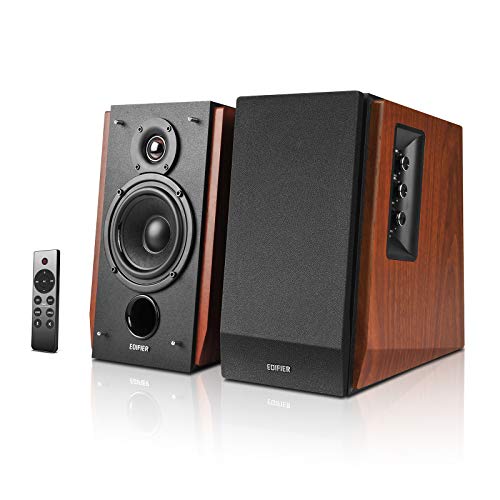
Edifier R1700BTs Bookshelf Speakers
Powered bookshelf speakers with 4-inch woofers, silk dome tweeters, 66W RMS, Bluetooth 5.0 with aptX HD, dual RCA inputs, and a subwoofer output for later expansion.
For editing and accurate listening. The PreSonus Eris 3.5 Gen 2 is a powered studio monitor pair with 3.5-inch woven-composite woofers, 50W Class AB amplification, and TRS, RCA, and aux inputs. Choose it if you edit audio or video and want to hear the recording as it is.

PreSonus Eris 3.5 Studio Monitors (Gen 2)
Editor’s ChoiceUpdated 2nd-gen near-field studio monitors with improved woven-composite woofers, 50W Class AB amplification, a power-saving auto mode, and optional Eris Sub 8BT compatibility — the best overall value studio monitor for a desk.
For games and movies with real bass. The Klipsch ProMedia 2.1 is THX-certified, with horn-loaded satellites, a 6.5-inch side-firing subwoofer, and a control pod for volume and sub gain. It fits a desk with floor space underneath where impact matters more than neutral tuning.

Klipsch ProMedia 2.1 THX System
A THX-certified 2.1 system with MicroTractrix Horn satellites, a 6.5" side-firing subwoofer, 200W peak, and a control pod with volume + sub gain — the best desk speaker system for immersive gaming, movies, and music.
FAQ#
Can I use studio monitors without an audio interface?#
Yes, if the monitors have an unbalanced input. A simple 3.5mm-to-RCA or 3.5mm-to-dual-TRS cable from your computer's headphone jack works, and some monitors, like the PreSonus Eris 3.5 Gen 2, add a front aux input for exactly this. An interface is still worth adding later if you hear noise or want balanced connections, but it is not required to get started.
Why do my desk speakers hum or buzz?#
The most common cause is a ground loop between your computer and the powered speakers, especially when they draw power from different outlets. Plug both into the same power strip first. If the hum persists, try a different input, use balanced TRS cables if the speakers support them, or move the speakers away from power bricks and phone chargers.
Is Bluetooth good enough for desk speakers?#
For music and podcasts from a phone, generally yes, and a codec like aptX HD narrows the gap with a wired connection when both devices support it. For gaming and video, a wired input is the safer choice because Bluetooth can introduce audible delay. The best setups use both: the computer on a wired input, the phone on Bluetooth.
Can I add a subwoofer to bookshelf speakers later?#
Only if the speakers have a subwoofer output or the sub has its own speaker-level or line-level pass-through. Check for a labeled sub out before you buy. The Edifier R1700BTs and Kanto YU2 both include one, which makes them easy to expand into a 2.1 setup when you want more low end.
When you are ready to compare specific models side by side, see our ranked list of the best desk speakers.