Back pain is one of the most common complaints among remote workers, and it's not hard to understand why. When your office is your home, the boundaries between work and rest blur. You work longer hours, sit on whatever chair is available, and rarely think about your setup until you're already in pain. The good news is that most work-from-home back pain is preventable and treatable with the right approach.
This guide covers everything from chair setup and desk ergonomics to movement habits and stretching routines. None of this requires expensive equipment — though we'll also cover where smart investments pay off.
Understanding Why WFH Causes More Back Pain#
A 2022 meta-analysis found that both the prevalence and the intensity of low back pain increased during COVID-19 lockdowns, when many people were suddenly working from home (Papalia et al., International Journal of Environmental Research and Public Health). Several compounding factors are specific to the home office environment.
No natural movement cues. In an office, you walk to meeting rooms, get coffee, chat with colleagues at their desks. These micro-movements — trivial as they seem — break up sitting time throughout the day. At home, you can go from 9am to 3pm without standing once.
Suboptimal furniture. Kitchen chairs, dining tables, and couches were not designed for 8-hour workdays. They lack lumbar support, force awkward elbow angles, and put screens at the wrong height.
Increased stress and tension. Remote work often blurs work-life boundaries, increasing overall stress. Chronic stress manifests physically in the form of muscular tension, particularly in the neck, shoulders, and lower back.
Longer unbroken sitting periods. Without colleagues around to interrupt you, it's easy to enter a focus state and sit motionless for two hours without realizing it.
The solution is multi-layered: better equipment, better habits, and targeted movement.
Getting Your Chair Setup Right#
Your chair is the most important piece of ergonomic equipment in your home office — more important than your desk. Most people significantly under-invest here. A quality ergonomic chair isn't a luxury; it's infrastructure.
The key adjustments to get right are:
Seat height: Your feet should rest flat on the floor (or a footrest), with your knees at approximately 90 degrees. If your chair is too high or too low, every other adjustment becomes compromised. If raising the chair to desk height leaves your feet dangling, OSHA's workstation guidance recommends a footrest to give them stable support (OSHA).
A simple footrest is the cheapest fix when your desk is too high for your legs.

Everlasting Comfort Foot Rest
Best ValueOne of the most popular footrests — premium high-density memory foam with dual stationary or rocking modes, an ergonomic teardrop shape, and a machine-washable removable cover.
Lumbar support: This is the most commonly neglected setting. Your lumbar support should sit in the curve of your lower back — usually around the belt line — and should feel like a gentle nudge forward, not a hard push. Most quality chairs have adjustable lumbar depth and height.
Seat pan depth: There should be roughly two to three fingers of space between the front edge of your seat and the back of your knees, so the seat edge never presses into the back of your legs. Sitting too far back in a deep seat compresses the back of your thighs and cuts off circulation.
Armrests: Armrests should allow your shoulders to relax and your elbows to rest at roughly 90 degrees without requiring you to hunch or lift your shoulders. Many people either never use their armrests or set them too high.
Back angle: A slight recline lets the backrest carry part of your upper body's weight instead of your lower back muscles. Counter to what most people assume, sitting bolt upright at 90 degrees is not the ideal: OSHA lists reclined sitting, with the torso roughly 105 to 120 degrees from the thighs, as one of its neutral working postures (OSHA), as long as your lower back stays supported.
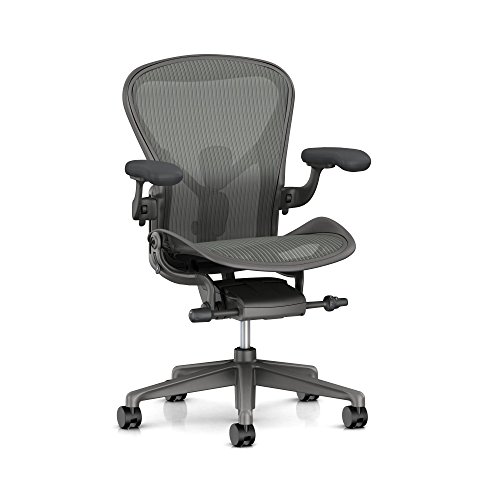
Herman Miller Aeron
Editor’s ChoiceThe Herman Miller Aeron is the definitive ergonomic chair — a 30-year-old design that still sets the benchmark for lumbar support, breathability, and long-session comfort.
The Herman Miller Aeron remains the gold standard for a reason. Its PostureFit SL system supports both the sacrum and lumbar spine — which most chairs only support at one point. The 8Z Pellicle mesh distributes weight evenly and allows air circulation, eliminating the heat and pressure buildup that causes fatigue in foam chairs. If you're serious about addressing back pain, the Aeron is the benchmark to measure everything else against.
Optimizing Your Desk and Monitor Setup#
Once your chair is right, your desk and monitor arrangement matters enormously. The most common mistake is a monitor that's too low — forcing you to look down and flex your neck forward for hours at a time. Forward head posture is one of the primary drivers of upper back and neck pain in office workers.
Monitor height: The top of your screen should be at or very slightly below eye level when you're sitting in a neutral, upright position. If you're using a laptop, a laptop stand combined with an external keyboard is essentially non-negotiable.
Monitor distance: Your screen should be roughly an arm's length away — about 50–70cm. This reduces eye strain and prevents you from unconsciously leaning forward toward the screen.
Monitor tilt: Tilt the monitor back slightly so the bottom of the screen is a little closer to you than the top. This reduces glare and puts the entire screen in a more natural field of view.
Keyboard and mouse placement: Both should be at the same height and close enough that you don't need to reach forward or extend your arms. Reaching for your mouse — even slightly — causes shoulder tension that accumulates over a full workday.
Desk height: With your chair set correctly, your desk height should allow your elbows to rest at roughly 90 degrees while your forearms are parallel to the floor. Many fixed-height desks are too high for shorter users; adjustable desk legs or a monitor arm can compensate.
A monitor arm is the most flexible way to get the screen to eye level and an arm's length away, whatever desk you're working at.
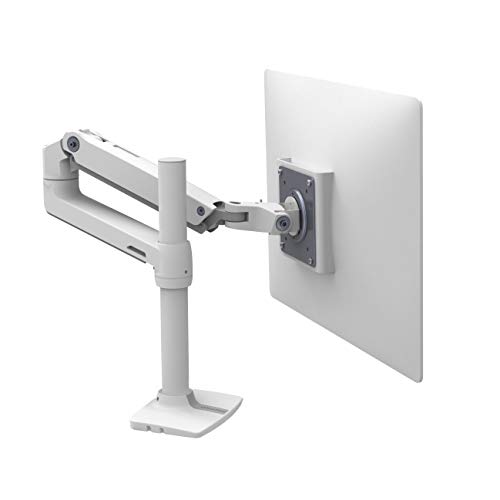
Ergotron LX Monitor Arm
Premium PickThe Ergotron LX is the gold standard for office monitor arms — smooth Constant Force technology, a clean white or black finish, and compatibility with monitors up to 34 inches.
The Role of Movement and Breaks#
No ergonomic setup eliminates the need for regular movement. The human spine was designed for dynamic loading — the act of moving, compressing, and decompressing spinal discs is what keeps them healthy and hydrated. Sustained static posture — even a good one — creates compressive stress over time.
OSHA's guidance is blunt on this point: change your working position frequently throughout the day, because even a good posture becomes unhealthy when it's held for long periods (OSHA). Short, regular breaks are the simplest way to do that. Here's a practical framework:
The 30/30 rule: Move for at least 2 minutes every 30 minutes of sitting. This doesn't mean exercise — standing up, walking to get water, or doing a few shoulder rolls counts.
Scheduled reminders: Most people mean to take breaks and forget. Use a physical timer, a phone alarm, or an app like Stretchly or Time Out to enforce the habit until it becomes automatic.
Micro-movements at your desk: Even small positional shifts — crossing your legs the other way, shifting your weight, leaning back for a minute — reduce the monotony of static loading. Don't just sit perfectly still in the "correct" position for hours.
Essential Stretches for WFH Back Pain#
Targeted stretching addresses the specific muscle tightening patterns that remote desk work creates. These take under 10 minutes and, done consistently, can ease a lot of daily stiffness.
Hip flexor stretch: Sitting for hours shortens the hip flexors and anteriorly tilts the pelvis, which directly increases lumbar lordosis and lower back pain. A kneeling hip flexor stretch — one knee on the floor, the other foot forward — held for 30–45 seconds per side is one of the highest-leverage interventions for desk workers.
Cat-cow stretch: Done on hands and knees, alternating between arching and rounding the spine, this rehydrates spinal discs and resets lumbar mobility. Ten slow reps in the morning makes a noticeable difference.
Thoracic spine extension over a foam roller: Upper back stiffness from hours of forward-leaning is extremely common. Lying over a foam roller positioned across your mid-back and gently extending opens the thoracic spine in the direction desk work closes it.
Doorway chest stretch: Arms extended at shoulder height against a door frame, lean forward gently to open the chest and counteract the forward-shoulder posture that monitor work encourages.
Seated piriformis stretch: Cross one ankle over the opposite knee while sitting, then gently lean forward. This addresses piriformis tightness, which can cause deep buttock pain and sciatica-like symptoms — a common WFH complaint.
Lifestyle Factors That Compound Desk Pain#
Your back pain isn't only happening between 9am and 5pm. Several lifestyle factors either amplify or protect against desk-related pain.
Sleep position and mattress: If your mattress is too soft or too firm, you're spending 7–8 hours in a compromised spinal position. Side sleeping with a pillow between your knees and a supportive mattress is generally best for the lumbar spine.
Hydration: Spinal discs have a high water content, and staying well hydrated is a sensible, low-effort habit. Just don't expect it to fix back pain on its own; the evidence for that is thin.
Strengthening exercise: Exercise is one of the better-supported treatments for chronic back pain. A 2021 Cochrane review found moderate-certainty evidence that exercise therapy probably reduces chronic low back pain compared with no treatment or usual care, although the improvements were modest (Hayden et al., Cochrane Database of Systematic Reviews). Two sessions a week of core and posterior chain work — not just abs, but the deep stabilizing muscles around your trunk — is a reasonable place to start.
Stress management: Psychological stress can show up as genuine physical muscle tension, particularly in the neck, shoulders, and back. Managing it is part of managing desk pain, and it doesn't mean the pain is "in your head."
When to Seek Professional Help#
Self-management is appropriate for most tension-based desk back pain. But certain symptoms warrant professional evaluation: pain that radiates down a leg (especially past the knee), numbness or tingling in the legs or feet, pain that wakes you from sleep, or pain that has persisted for more than six weeks without improvement.
A physiotherapist can identify specific movement dysfunctions and prescribe targeted exercises far more effectively than generic advice. If you're dealing with significant pain, a consultation is worth far more than any ergonomic product.
For the vast majority of desk workers, though, the combination of a quality chair, correct monitor height, regular movement breaks, and a few targeted stretches will make a noticeable difference within a few weeks.